Windows XP Windows 7 Windows 2003 Windows Vista Windows 綜合教學 Linux 系統教學
Windows 10 Windows 8 Windows 2008 Windows NT Windows Server 電腦軟體教學

Win7 VHD 原生開機實現:磁碟管理建立/掛載 VHD、DiskPart 指令操作、BCDEdit 加入開機選單

編輯:Win7 系統應用技巧

Win7 核心內建 VHD 讀寫驅動,支援將 VHD 視為實體硬碟操作,並可透過 BCDEdit 將 VHD 內作業系統加入開機選單,實現無虛擬機效能損耗的原生多重開機。

三大核心操作

1. 磁碟管理建立/掛載 VHD

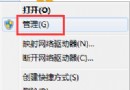
  • 右鍵「電腦」→「管理」→「磁碟管理」→ 動作 → 「建立 VHD」/「連結 VHD」/「卸離 VHD」。
  • 指定路徑、大小、類型(動態擴充/固定大小),生產環境建議固定大小獲取較佳效能。
  • 建立後如實體硬碟般「初始化」→「新增簡單磁碟區」→ 格式化 NTFS、指派代號。

2. DiskPart 指令精確控制

diskpart
create vdisk file="D:\Win7.vhd" maximum=20000 type=fixed
select vdisk file="D:\Win7.vhd"
attach vdisk
create partition primary
format fs=ntfs quick
assign letter=V
detach vdisk

3. BCDEdit 將 VHD 系統加入開機選單

bcdedit /copy {current} /d "Win7 from VHD"
bcdedit /set {guid} device vhd=[D:]\Win7.vhd
bcdedit /set {guid} osdevice vhd=[D:]\Win7.vhd
bcdedit /set {guid} detecthal on

({guid} 為上一條指令產生的新項目識別碼)

關鍵特性

  • VHD 開機後直接存取硬體,非虛擬化運行,I/O 效能損耗微乎其微(經測試 <1%)。
  • 不需安裝 Hyper-V/Virtual PC,Win7 核心原生支援。
  • 無法從光碟直接安裝系統至 VHD,需先在虛擬機/實體機安裝完成並執行 sysprep,或用 ImageX 還原映像至 VHD。

VHD 原生開機讓系統部署、備份、遷移、測試極具彈性,是 IT 管理與進階用戶的利器。

Copyright © Windows教程網 All Rights Reserved