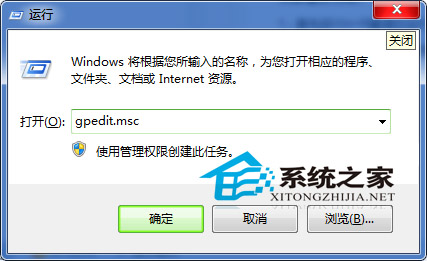
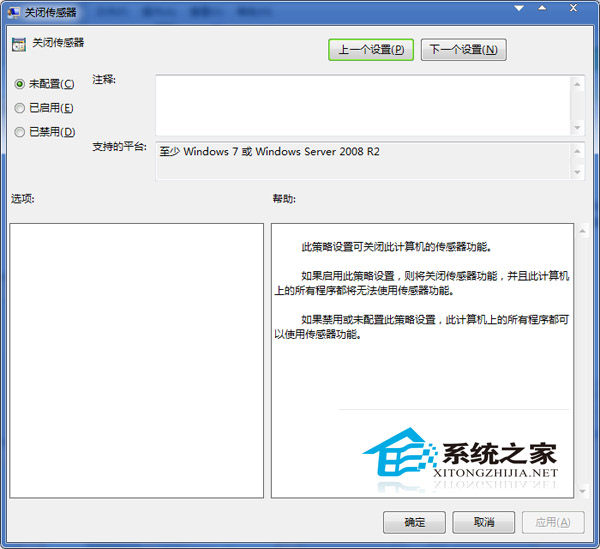
Win7 內建感應器功能(位置、環境感應等)現今多由手機 GPS 取代,筆電/桌機鮮少使用,可透過群組原則完全停用以釋放資源:
gpedit.msc
補充: 此設定對應登錄檔 HKEY_CURRENT_USER\Software\Policies\Microsoft\Windows\Sensors\DisableSensors = 1 (DWORD)。若需恢復,將原則設為「未設定」或刪除該登錄檔值。停用後「控制台 → 位置與其他感應器」將無可用感應器。
HKEY_CURRENT_USER\Software\Policies\Microsoft\Windows\Sensors\DisableSensors
Win7 桌面小工具在哪?新增、調整、關閉完整操作指南
Win7 磁碟機顯示「未標記磁碟區」/無磁碟代號?啟用「顯示磁碟機代號」恢復
Win7 Photoshop 修改 GIF 文字後無法播放?圖層合併與幀動畫重建教學
Windows 7 ReadyBoost 无法启用:启用 Superfetch 服务修复依赖链缺失
Win7 升級 VirtualBox 後虛擬機無法開啟的 uxtheme.dll 修復法
筆電如何恢復出廠設定?兩大層面完整操作指南
4500 元組裝電腦配備推薦:2024 年高 CP 值方案解析
Win7 螢幕重新率怎麼設定?桌面右鍵 → 解析度 → 進階 → 監視器四步驟