Windows XP Windows 7 Windows 2003 Windows Vista Windows 綜合教學 Linux 系統教學
Windows 10 Windows 8 Windows 2008 Windows NT Windows Server 電腦軟體教學

Win7 開機進入 GRUB 命令列?三行指令快速啟動 Windows

編輯:Win7 系統應用技巧

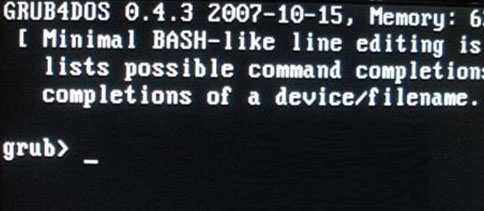
Windows 7 開機直接進入 `grub>` 命令列提示符 (無選單),表示 GRUB 設定檔遺失/損毀,或 MBR 開機代碼指向錯誤位置。此時可手動輸入 GRUB 指令**鏈式載入 Windows 啟動載入器**,臨時進入系統後再永久修復 MBR。

GRUB 命令列臨時啟動 Windows 指令

在 `grub>` 提示符下依序輸入 (假設 Windows 安裝在第一顆硬碟第一個分區):

grub> rootnoverify (hd0,0)
grub> makeactive
grub> chainloader +1
grub> boot
  • rootnoverify (hd0,0):設定根裝置為第一顆硬碟 (`hd0`) 第一個分區 (`0`),**不驗證檔案系統** (避免 NTFS 驅動問題)。
  • makeactive:將該分區標記為作用中 (啟動分區)。
  • chainloader +1:鏈式載入該分區啟動區 (PBR) 的第一個扇區代碼 (即 Windows BOOTMGR 代碼)。
  • boot:執行載入。

GRUB 命令列輸入指令

分區代號對照 (關鍵)

**請根據實際分區結構調整 `(hd0,0)`**。可在 GRUB 命令列輸入 `ls` 列出所有偵測到的分區,或 `ls (hd0,0)/` 檢查分區內容確認是否為 Windows 分區 (含 `bootmgr`、`Boot`、`Windows` 資料夾)。

進入 Windows 後必做:永久修復 MBR

  1. 管理員命令提示字元執行:
    bootsect /nt60 SYS /mbr
    bcdboot C:\Windows /l zh-TW /s C: /f BIOS
  2. 或使用 EasyBCD → 「MBR 修復」 → 「安裝 Windows MBR」 → 「寫入 MBR」。
  3. 重新開機驗證直接進入 Windows,不再出現 GRUB。

替代方案:直接重灌 (最省心)

  • 備份資料 → 官方安裝 USB → 格式化系統分區 → 全新安裝 Windows 7/10/11。徹底清除 GRUB、舊系統殘留,獲得最乾淨環境。

背熟三行 GRUB 指令 (`rootnoverify`、`makeactive`、`chainloader +1`),關鍵時刻能救場進系統修復 MBR。但**重灌永遠是最徹底的答案**。

Copyright © Windows教程網 All Rights Reserved
GRUB 表示法對應實體
`(hd0,0)`第一顆硬碟、第一個分區 (通常為系統保留分區/系統分區)
`(hd0,1)`第一顆硬碟、第二個分區
`(hd1,0)`第二顆硬碟、第一個分區