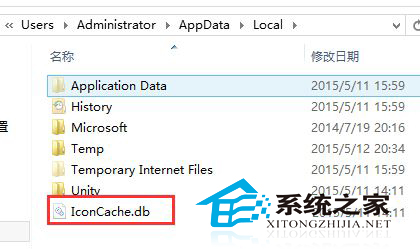
桌面圖示全部變成預設白紙圖示僅顯示名稱,主因是圖示快取檔 IconCache.db 損壞。刪除該檔並重開機即可強制重建。
IconCache.db
C:\Users\您的使用者名稱\AppData\Local
若無效,嘗試建立新使用者帳號或使用系統還原點還原。
C 槽從 1TB 變 119GB?其實是 SSD+HDD 雙硬碟「換盤」了
22 吋螢幕最佳解析度是多少?16:10 建議 1680×1050、16:9 建議 1680×945
Win7 如何更改圖片副檔名?顯示副檔名後直接重新命名
Win7 硬碟圖示想換?建立 autorun.inf + .ico 檔案自訂磁碟機圖示
Win7 安裝 KB3038314 更新出現 80092004 錯誤的完美解決流程
Windows 7 開機自動 ADSL 撥號連網五大法:IE 設定、啟動資料夾、登錄、任務排程器、VBS 腳本
這配置能玩 H1Z1 嗎?CPU 夠強、顯卡太弱,換 GTX 1050 Ti/1060 即可高幀
Win7 如何徹底移除 IE8 瀏覽器?金山衛士一鍵卸載教學