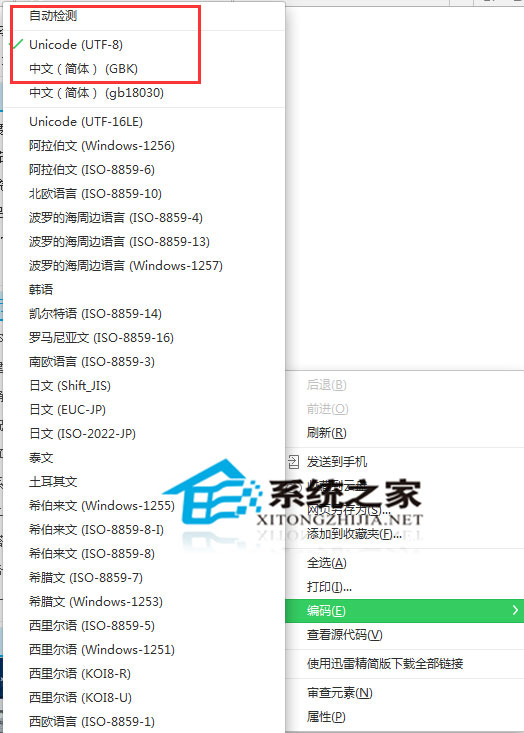
網頁亂碼多半是瀏覽器自動判斷編碼失敗。IE 右鍵空白處 →「編碼」→ 在「自動選擇」、「簡體中文 (GB2312)」、「Unicode (UTF-8)」等項目間嘗試切換,通常能瞬間正常顯示。
預設「自動選擇」依賴網頁 <meta charset> 標籤,缺標籤或標籤錯誤時需手動指定。幾個常用編碼輪著試,90% 情況能搞定。別慌、別重裝瀏覽器,這招必學。
<meta charset>
Vista 新增印表機提示「列印後台服務未啟動」?一鍵啟動 Print Spooler 解決
Win7 安裝網卡後沒聲音?排查聲卡衝突與解決方案
Win7 桌面建立「休眠」快捷方式與熱鍵:一鍵/熱鍵快速進入休眠模式
路由器管理頁面進不去?網線插錯、IP衝突、快速定位解決全流程
Win7 使用 Daemon Tools Lite 掛載虛擬光碟機完整圖文教學
Windows 7/8.1 免費升級 Windows 10 後還需年費?官方回應:永久免費更新
Win7 找回消失的「相容模式」:群組原則啟用程式相容性分頁教學
筆電藍牙怎麼開啟?Win7 控制台 → 網路共用中心 → 變更介面卡設定啟用藍牙裝置