Windows XP Windows 7 Windows 2003 Windows Vista Windows 綜合教學 Linux 系統教學
Windows 10 Windows 8 Windows 2008 Windows NT Windows Server 電腦軟體教學

Win7 光碟機圖示消失?登錄刪除 UpperFilters/LowerFilters 恢復辨識

編輯:Win7 系統應用技巧

裝置管理員找不到光碟機或有黃驚嘆號,且安裝驅動無效。刪除登錄 {4D36E965-E325-11CE-BFC1-08002BE10318} 下的 UpperFilters、LowerFilters 值,重開機即可恢復光碟機圖示與功能。

修復步驟

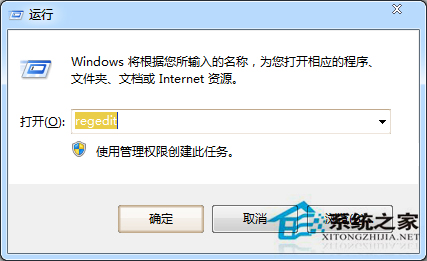
  1. regedit → 定位 HKEY_LOCAL_MACHINE\SYSTEM\CurrentControlSet\Control\Class\{4D36E965-E325-11CE-BFC1-08002BE10318}。
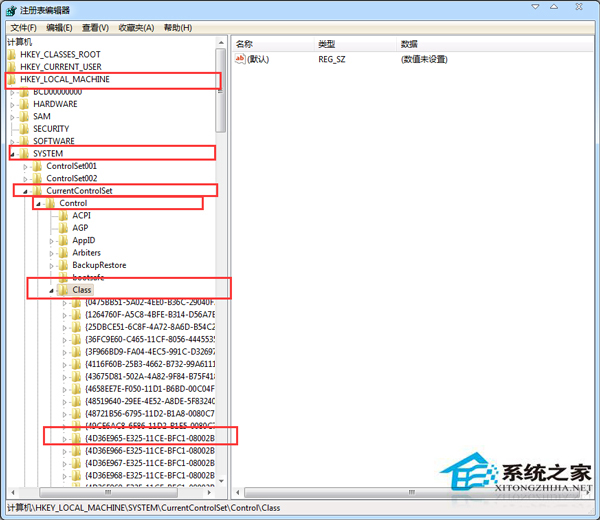
  2. 右側刪除 UpperFilters、LowerFilters (若存在)。
  3. 關閉登錄編輯器 → 登出或重開機。

開啟 regedit

Class GUID 定位

若硬體故障 (線材鬆動/光碟機損壞) 則需硬體維修。

Copyright © Windows教程網 All Rights Reserved