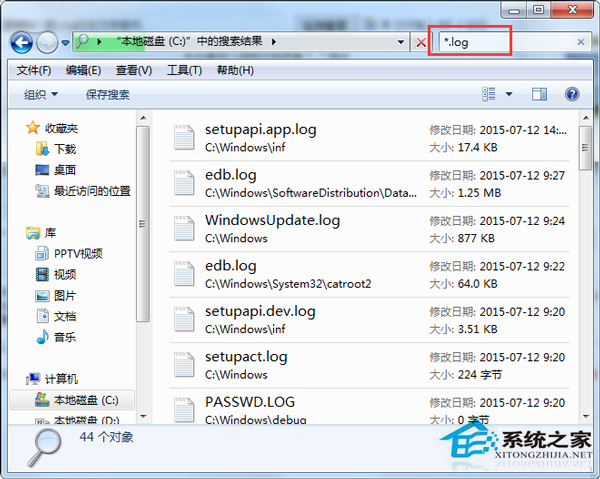
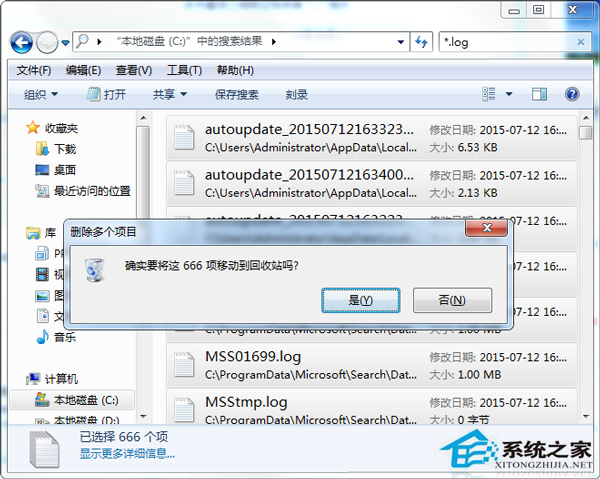
系統長期運行產生大量 .log 檔佔用 C 槽空間。用檔案總管搜尋 *.log 批量刪除,比逐個手刪快上百倍。
*.log
* 代表任意檔名,.log 為副檔名條件。定期清理可保持系統輕量。
*
.log
Win7 降級安裝 XP 系統:OneKey Ghost 硬碟安裝法圖文詳解
手機外接鍵鼠能當筆電用嗎?體驗遠不如預期
解決 Windows 7 遊戲無法啟動、閃退與全螢幕問題完整教學
Win7 讓喇叭與耳機各自獨立音量:Realtek 高解析音訊管理員設定教學
Win7 桌面小工具無法使用?註冊核心 DLL 修復 Sidebar 功能
Win7 「預設閘道不可用」導致斷網頻繁?三大排查方向與解決方案
修改 Windows hosts 檔案完整教學:加速解析、區域網路別名、封鎖惡意網站、順利連線伺服器
Windows 7 隱藏個人檔案 7 步驟完整教學:從屬性設定到資料夾選項雙重保護