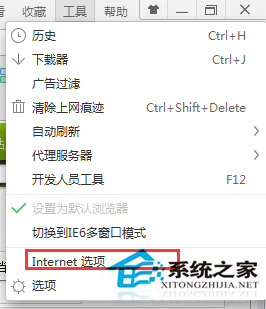
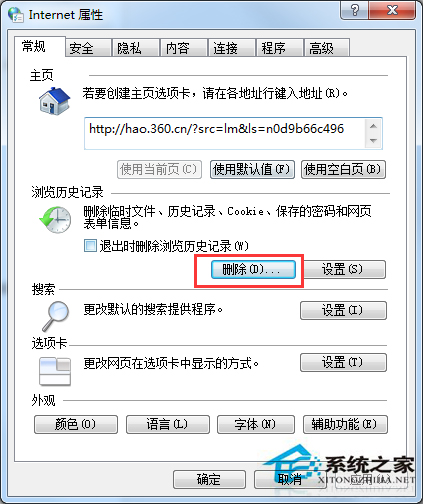
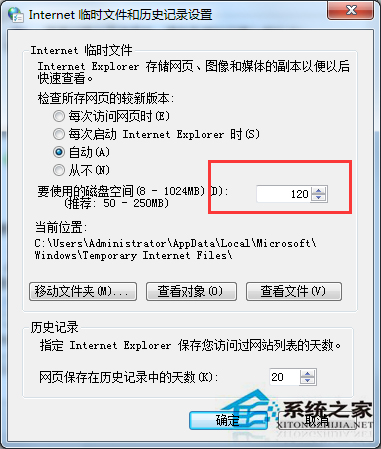
網路正常但網頁顯示不全、圖片缺失、排版錯亂,通常為 IE 暫存檔 (Temporary Internet Files) 損毀或磁碟空間上限不足導致新內容無法快取。清除快取並調大空間上限即可解決。
此問題亦常見於其他瀏覽器 (Chrome/Edge/Firefox),同理清除快取 Cookie 即可解決。若特定網站持續異常,嘗試無痕模式測試排除擴充功能干擾。
Win7 系統開啟 .vsd 檔案完整指南:Visio 安裝與關聯設定
Win7 如何設定螢幕保護程式?個人化三步驟快速啟用
Windows 7 誤刪隱藏分區導致無法開機?安裝光碟修復分區表
開機卡在「歡迎」介面久、進桌面黑屏、無網路、遊戲跑不起?硬碟/記憶體/系統三大嫌疑
這台電腦配置怎麼樣?入門辦公機,看影片勉強、玩遊戲免談
Windows 7 媒體中心個人化設定:支援 RMVB、隱藏電視功能、加入自訂程式、快捷方式與隱私清理
Win7 系統登錄檔損毀修復全攻略:兩大實用方法
微軟確認:Win7/8.1 庫存須於 2016 年 10 月 31 日前清空