Windows XP Windows 7 Windows 2003 Windows Vista Windows 綜合教學 Linux 系統教學
Windows 10 Windows 8 Windows 2008 Windows NT Windows Server 電腦軟體教學

Win7 開啟 Windows PowerShell 視窗的兩種方法

編輯:Win7 系統應用技巧

Windows PowerShell 是強大的命令列殼層與腳本環境。以下提供兩種快速開啟方式(建議以系統管理員身分執行)。

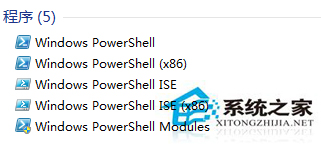
方法一:開始功能表搜尋

  1. 按 Win 鍵或點擊「開始」,在搜尋框輸入 Windows PowerShell。
  2. 在搜尋結果上右鍵,選擇「以系統管理員身分執行」。
  3. 搜尋 PowerShell 並以管理員身分執行

方法二:所有程式清單

  1. 點擊「開始」→「所有程式」→「附屬應用程式」→「Windows PowerShell」。
  2. 右鍵點選「Windows PowerShell」,選擇「以系統管理員身分執行」。
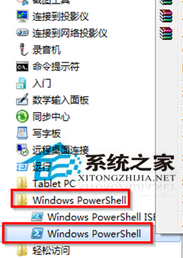
  3. 從附屬應用程式開啟 PowerShell

兩種方式任選其一,習慣用鍵盤的使用者推薦方法一。

Copyright © Windows教程網 All Rights Reserved