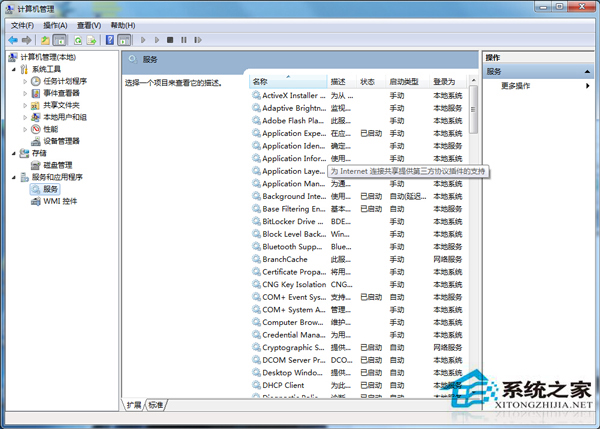
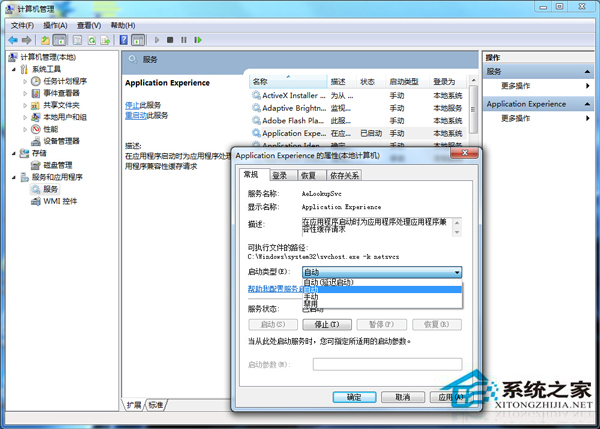
磁碟清理、刪除檔案異常緩慢?常因 Application Experience 和 Program Compatibility Assistant Service 兩項服務未啟動 (預設為手動)。設為自動啟動即可恢復清理速度。
原理: 這兩項服務負責程式相容性偵測、應用程式遙測與清理優化,停用會導致檔案刪除/清理操作卡在相容性檢查階段。啟用後清理速度立即恢復正常。
Win7 磁碟機容量不顯示?修改登錄恢復磁碟資訊
Windows 7 開始功能表空白?調整「最近開啟程式數目」即可修復
SynTPEnh.exe 是什麼程序?Synaptics 觸控板驅動元件,筆電必備不可刪除
Windows 7 取得檔案/資料夾完整控制權:匯入登錄檔或用優化工具加入右鍵選單
這台電腦能跑《爐石戰記》嗎?DDR2 古董機勉強能開、建議換機才舒服
Win7 開機黑畫面兩大類型分析與對策:純黑 vs. 僅顯示滑鼠游標
Win7 桌面圖示變空白/異常怎麼辦?三大成因與對應修復法
Win7 家用版升級旗艦版教學:Windows Anytime Upgrade 使用升級金鑰 10 分鐘完成