右鍵程式選「釘選到任務列」無反應、圖示不顯示?這是註冊表 lnkfile 下 IsShortcut 字串值遺失導致。建立 .reg 檔案匯入即可一鍵修復。
lnkfile
IsShortcut
.reg
Windows Registry Editor Version 5.00
[HKEY_CLASSES_ROOT\lnkfile]
"IsShortcut"=""
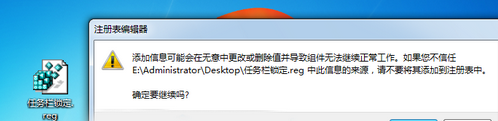
任務列釘選修復.reg
explorer.exe
匯入後,任務列釘選、鎖定功能即刻恢復正常。
Win7 家庭組組建局域網:三步實現檔案共享、聯機遊戲,比工作組簡單百倍
Win7 訪問局域網共享提示「無權限使用網路資源」?刪除「拒絕從網路訪問」Guest 限制
老電腦升級還是重新組裝?6-7 年主機決策指南與性價比方案
Win 7「開啟或關閉 Windows 功能」空白無內容?三大解決方案:服務、系統修復、登錄修正
三年舊筆電還能戰幾年?升級記憶體與固態硬碟讓老筆記本煥發新生
Win7 登入 QQ 任務列無圖示?Ctrl+Alt+Z 喚出主面板、設定通知區域顯示圖示兩法解決
Home/End:總管、文件、網頁、命令列——一鍵直達頂端/底端
Windows 7 開機加速兩大絕招:登錄檔優化與多核心啟動