Windows XP Windows 7 Windows 2003 Windows Vista Windows 綜合教學 Linux 系統教學
Windows 10 Windows 8 Windows 2008 Windows NT Windows Server 電腦軟體教學

Windows 7 使用群組原則移除關機選單「登出」選項:簡化關機介面

編輯:Win7 系統應用技巧

Windows 7 關機選單包含「切換使用者、登出、鎖定、重新啟動、睡眠、休眠、關機」。若環境不需「登出」功能(如單一帳號、自動登入),可透過群組原則隱藏該選項,簡化介面防誤操作。

設定步驟

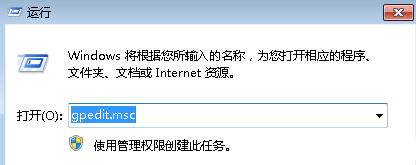
  1. 按 Win + R 輸入 gpedit.msc 開啟群組原則編輯器。
  2. 展開:
    使用者設定 → 系統管理範本 → 所有設定
  3. 在右側清單找到 移除登出(或「從開始功能表移除登出」),雙擊開啟。
  4. 選擇 已啟用 → 確定。
  5. 重新登入或重開機生效,「登出」選項即從關機選單消失。

群組原則編輯器移除登出設定

注意:此設定僅隱藏介面選項,不影響 Ctrl+Alt+Del 選單中的登出功能,亦不影響命令列 shutdown /l。家用版無 gpedit.msc 可改修改登錄:
HKEY_CURRENT_USER\Software\Microsoft\Windows\CurrentVersion\Policies\Explorer 新建 DWORD NoLogOff = 1。

Copyright © Windows教程網 All Rights Reserved