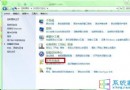
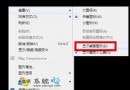
Win 7 光碟機無故自動彈出,影響使用。根因在於「Shell Hardware Detection」服務誤判硬體事件觸發自動播放。停用該服務即可解決。
services.msc
光碟機屬硬體,但誤觸發多由軟體服務引起,調整服務設定即可輕鬆解決,新手也能操作。
Win7 藍屏 Win32K.sys 錯誤?安全模式乾淨啟動排查流程
Windows 7 Beta 軟體相容性清單:安裝失敗、執行異常與解決方案彙總
Windows 7 ADSL/路由器/撥號/Modem 上網完整設定圖文教學
Win7 旗艦版開機無法完成 POST 自檢?五大常見硬體故障原因與排查方向
Win7 資料夾圖示上的「鎖」圖示怎麼去掉?共享→取消共享兩步淨化
Win7 禁用程式相容性助手服務:關閉彈窗提示「建議設定重新安裝」
Windows XP 記憶體讀寫錯誤徹底解決方案:插件、服務、系統檔、記憶體釋放
Win7 USB 裝置無法辨識?三大常見原因與排除步驟