電腦時間不準影響生活作息,Win7 內建網路時間同步功能,可自動校正時鐘。
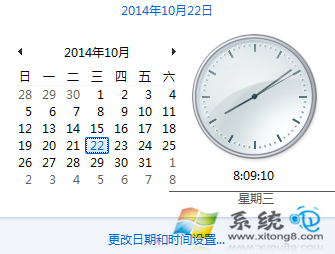
1. 工作列右下角時間處按左鍵,點選「變更日期和時間設定」。
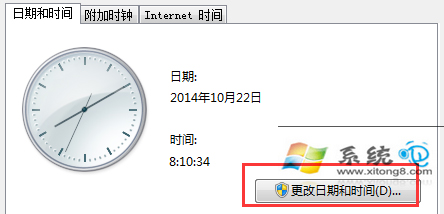
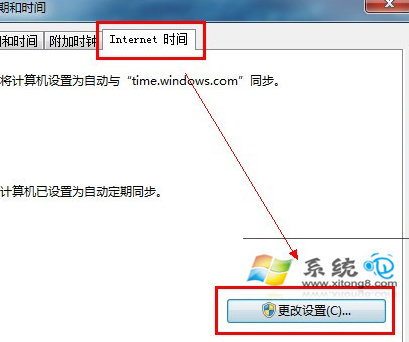
2. 在「日期和時間」頁籤可手動調整;切換至「網路時間」頁籤,點「變更設定」,勾選「與網路時間伺服器同步」,點「立即更新」再按確定。
設定完成後,系統將定期自動同步網路時間,保持時鐘精準。
移除 Win 7 後殘留的雙系統開機選單:XP 與 Vista 環境下的解決辦法
盜版 Windows 7 暗藏木馬 建構殭屍網絡感染率驚人
Win7 任務列縮圖不見了怎麼辦?透過群組原則啟用縮圖功能
Win7 右下角彈出 Awc.exe 損壞檔案警告?磁碟檢查修復教學
Windows 7 不重開機變更 MAC 位址教學:裝置管理員直接修改生效
Win7 64 位 IE 無法加入我的最愛?修復登錄 Favorites 路徑指向 %USERPROFILE%\Favorites
提升系統搜尋速度:善用第三方工具「光速搜尋」替代 Win7 內建搜尋
Windows 7 內建虛擬 Wi-Fi 熱點建置教學:無需第三方軟體共享上網