想用鍵盤快速關機重開機?Win7 內建熱鍵與自訂捷徑兩種方式任你選。
一、系統內建熱鍵
- 關機:Win(放開)→ → → Enter
- 重開機:Win → → ×2 → ↑ → Enter
- 注意:若開始功能表關機鍵被改為「睡眠」,需配合 ↑ 選擇關機
二、自訂捷徑熱鍵
- 桌面右鍵 → 「新增」 → 「捷徑」
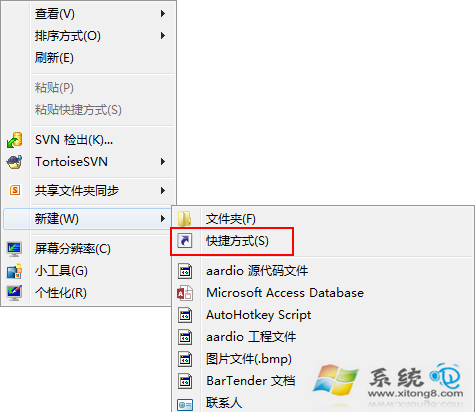
- 位置輸入:
shutdown -s(關機)或 shutdown -r(重開機) → 命名
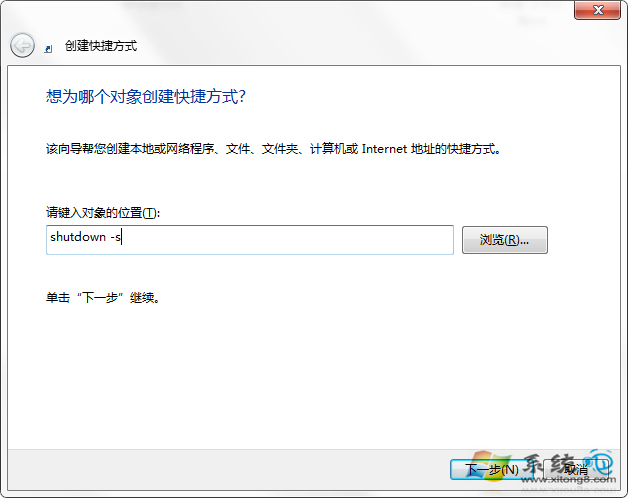
- 捷徑右鍵 → 「內容」 → 「捷徑鍵」設定(如 F11)
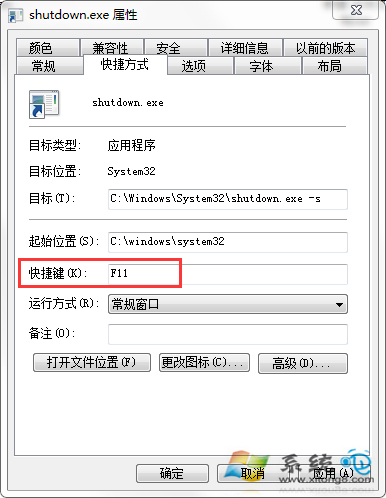
說明
自訂捷徑方式更直觀,按一次即執行,適合習慣鍵盤操作的使用者。