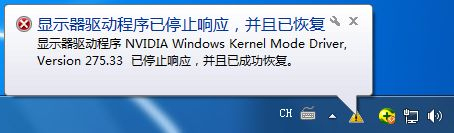
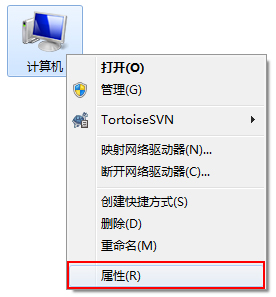
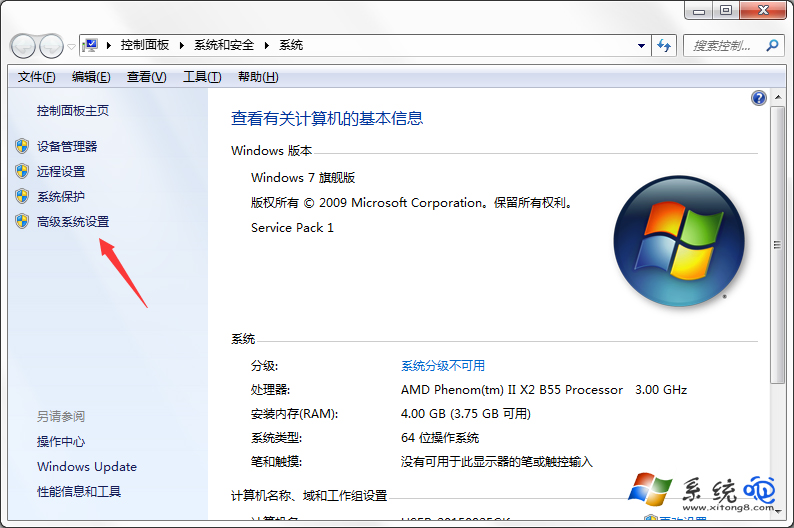
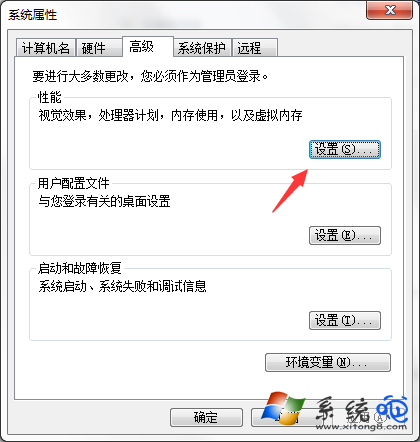
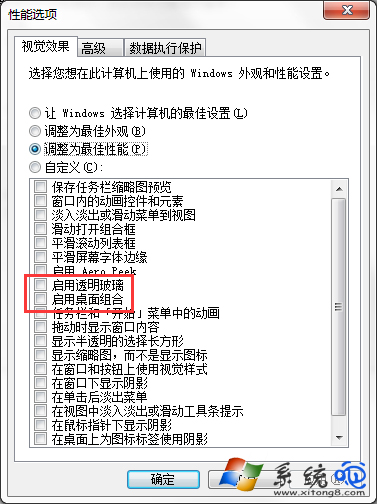
右下角頻繁彈出「顯示器驅動程式已停止回應並已恢復」,主因是 Aero 玻璃特效與桌面合成導致顯示卡在 2D/3D 模式頻繁切換。解法:進入系統進階設定→效能設定→自訂,取消勾選「啟用透明玻璃」與「啟用桌面合成」,確定套用即可。
關閉特效後畫面雖失去透明質感,但能徹底解決驅動程式頻繁停止回應的困擾。
Win7 開機提示找不到 helpctr.exe?清理註冊表與啟動項修復幫助程式錯誤
Win7 禁止修改檔案屬性:註冊表設定 NoFileAssociate 保護檔案安全
Windows 7 遊戲無法全螢幕通用解決方案 (註冊表/顯卡設定)
基於 Vista 升級而來:Windows 7 UAC (使用者帳戶控制) 深度解析與四級防護詳解
Win7 旗艦版桌面卡死?Ctrl+Alt+Esc 重啟 Explorer.exe 秒解
Win7 更換主題不想變滑鼠指標與桌面圖示?一招鎖定設定
Windows 7 XP Mode 非安全沙箱:虛擬機內外均須安裝防毒軟體並修補
Win7 工作列左側空白怎麼辦?解鎖工作列拖動分隔符還原圖示位置