Windows XP Windows 7 Windows 2003 Windows Vista Windows 綜合教學 Linux 系統教學
Windows 10 Windows 8 Windows 2008 Windows NT Windows Server 電腦軟體教學

Win7 Windows Update 錯誤 0x80070005 解決方案:權限與惡意軟體雙管齊下

編輯:Windows 7 系統介紹

錯誤含義

錯誤代碼 0x80070005 代表「存取被拒絕」,通常是因為權限不足或系統檔案被惡意軟體修改導致 Windows Update 無法寫入更新檔案。

解決方法

方法一:以系統管理員身分登入並執行更新

  • 確認目前登入帳戶具備管理員權限。
  • 若為標準用戶,請切換至管理員帳戶或以「系統管理員身分執行」命令提示字元,輸入 wuauclt /detectnow 強制檢查更新。

方法二:全盤掃描清除惡意軟體

  • 使用安裝的防毒軟體執行「完整掃描」。
  • 若無防毒軟體,可下載執行 Microsoft Safety Scanner(免費一次性掃描工具)。
  • 刪除/隔離所有偵測到的威脅後,重新啟動電腦再嘗試 Windows Update。

進階補充(若上述無效)

  • 重設 Windows Update 元件:以管理員身分執行 CMD,依序輸入 net stop wuauserv、net stop bits、ren %systemroot%\SoftwareDistribution SoftwareDistribution.old、net start wuauserv、net start bits。
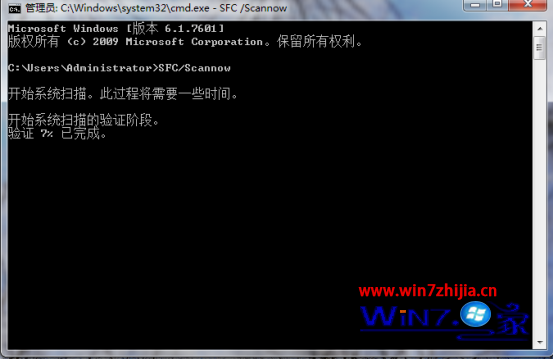
  • 執行系統檔案檢查:CMD 輸入 sfc /scannow 修復損毀系統檔。
錯誤 0x80070005 畫面
Copyright © Windows教程網 All Rights Reserved