安裝新驅動、軟體前,建立還原點可確保出問題時能回溯。
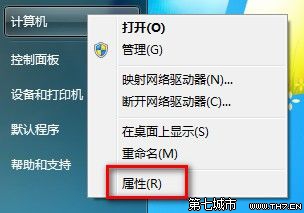
還原點僅包含系統檔案、登錄、驅動程式,不影響個人文件。
Win7 輸入法切換 Ctrl+Shift 失效解決:殺毒、檢查輸入法設定、重新啟動電腦、重裝系統四級方案
控制台出現「Tencent QQMail Plugin」是什麼?可否移除?
Win7 桌面圖示文字有陰影怎麼取消?效能選項關閉「桌面圖示標籤使用陰影」
Win7 任務列右鍵選單變了?Shift+右鍵喚回傳統「移動/最大化/最小化/關閉」選單
Win7 開始選單程式顯示條數太多/太少?自訂「要顯示的最近開啟程式數目」改為想要條數
Windows Server 2008 R2 SP1 部署 Exchange 2010 SP1 完整實作筆記