ReadyBoost 利用 USB 隨身碟快取資料以加速系統回應。啟用條件與步驟如下:
啟用條件
- USB 隨身碟容量 ≥ 實體記憶體 2 倍(如 4GB 記憶體需 ≥ 8GB 隨身碟)。
- 隨身碟讀寫速度達標(系統會自動測試)。
設定步驟
- 插入隨身碟,於「電腦」中右鍵該磁碟 →「內容」。
- 切換「ReadyBoost」索引標籤。
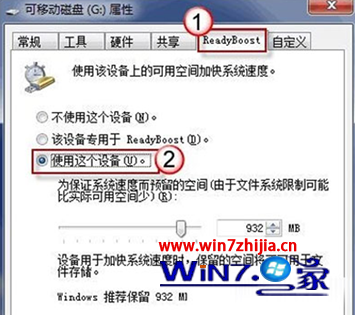
- 選擇「使用這個裝置」,系統會建議空間大小,可自行調整 → 確定。
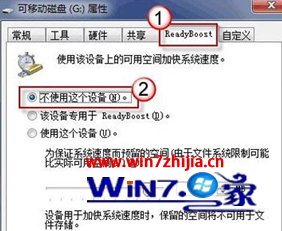
若未來不想使用,同樣進入此頁面選擇「不使用這個裝置」即可停用。ReadyBoost 對機械硬碟系統提升較明顯,SSD 系統效果有限。