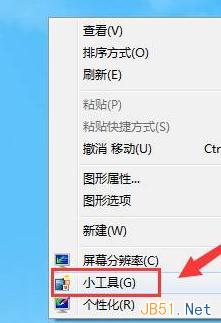
Windows 7 桌面小工具平台內建日曆工具,幾步驟即可將月曆固定在桌面,方便隨時查看日期與農曆。
提示:若小工具平台被關閉,可在「控制台」→「程式」→「開啟或關閉 Windows 功能」中勾選「Windows 小工具平台」重新啟用。
Windows 照片檢視器背景色自訂:從刺眼白到護眼灰,註冊表一鍵搞定
Windows 7 新無線網路功能:虛擬 Wi-Fi 讓單張網卡支援多重連線
Windows 7 暗藏「木馬」直指 Google?移除整合應用推 Windows Live
Windows 7 備份還原與更新功能深度學習:媒體庫、系統映像、排程自動化
Win7 系統重新安裝 TCP/IP 協定解決無法上網問題
Win7 掃描儀在哪裡?兩種快速開啟「Windows 传真與掃描」方法
Win7 程式庫功能全攻略:讓凌亂檔案秒變有序資產
善用 Windows 7 內建疑難排解解決電腦沒聲音問題