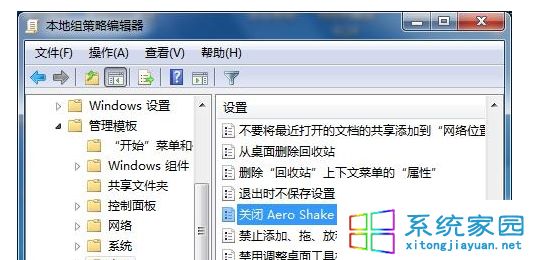
無意搖晃視窗導致其他視窗全最小化?關閉 Aero Shake 手勢功能,減少誤觸發並釋放少量系統資源。
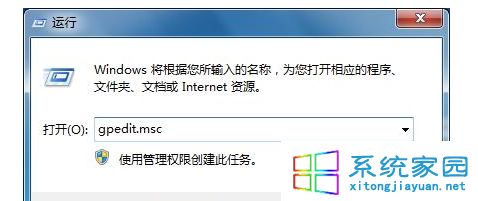
gpedit.msc
gpupdate /force
註:家用版可用註冊表 HKEY_CURRENT_USER\Software\Policies\Microsoft\Windows\Explorer 新增 DWORD NoWindowMinimizingShortcuts=1 達到同樣效果。
HKEY_CURRENT_USER\Software\Policies\Microsoft\Windows\Explorer
NoWindowMinimizingShortcuts=1
Win7 群組原則無法開啟:MMC 無法建立管理單元解決
Win7 停用視窗自動靠邊排列(Aero Snap)
Windows 7 修改與刪除網路連線名稱(合併重複網路位置)
Win7自動更新報錯80072EE2解決:重置SoftwareDistribution目錄與Wuauserv服務
Win7 安裝無線路由器完整圖文:電腦/寬帶/路由器接線 → 本地連線自動取得 IP → 瀏覽器 192.168.1.1 設定 PPPoE → 開啟無線/設定 PSK 密碼
微軟數據:64 位 Windows 感染率顯著低於 32 位,PatchGuard 成關鍵防線
Windows 7 效能優化:7 招實用技巧讓系統跑得更順
移除 Win 7 後殘留的雙系統開機選單:XP 與 Vista 環境下的解決辦法