Windows XP Windows 7 Windows 2003 Windows Vista Windows 綜合教學 Linux 系統教學
Windows 10 Windows 8 Windows 2008 Windows NT Windows Server 電腦軟體教學

Win7 64位 修復桌面小工具更新卡住:清除 Sidebar 快取重啟服務

編輯:Windows 7 系統介紹

Windows 7 桌面小工具若出現「更新停滯」、氣象不更新、RSS 不重新整理,主因是 sidebar.exe 快取資料損毀。透過結束進程、重命名/刪除快取資料夾、重新啟動服務即可徹底修復。

修復步驟

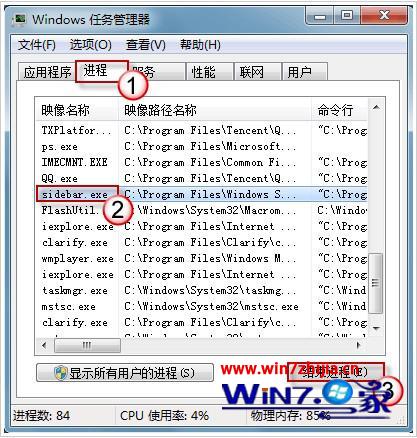
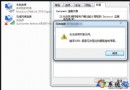
  1. Ctrl+Shift+Esc 開啟工作管理員 → 「進程」頁籤 → 找到 sidebar.exe → 右鍵「結束處理序」。
  2. 結束 sidebar.exe 進程
  3. Win+E 開啟檔案總管 → 網址列輸入 %localappdata%\Microsoft\Windows\LiveServices → 將 Cache 資料夾重命名為 Cache.old。
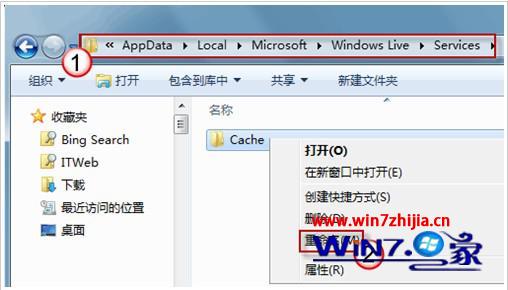
  4. 重命名 LiveServices 快取
  5. 網址列輸入 %localappdata%\Microsoft\Windows\Sidebar\Cache → 刪除此資料夾內所有檔案 → 並進入各小工具資料夾刪除其 Cache 子資料夾。
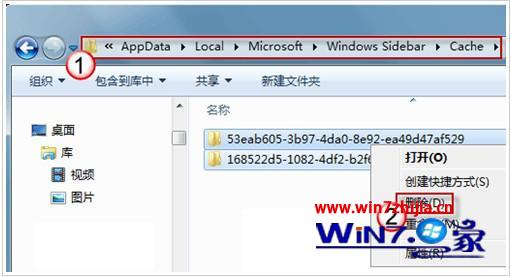
  6. 刪除 Sidebar 快取
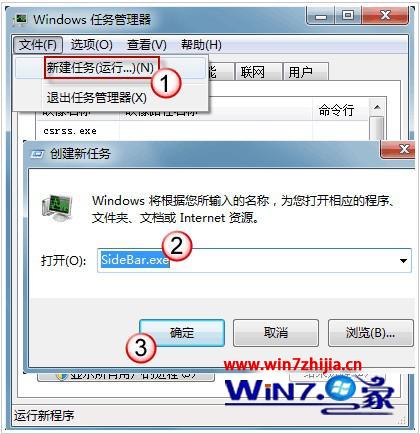
  7. 工作管理員 → 「檔案」→「新增工作」→ 輸入 sidebar.exe → 確定,小工具重新載入並恢復正常更新。
  8. 重新啟動 sidebar.exe

預防建議

  • 避免同時執行多個同類小工具(如兩個氣象小工具)。
  • 定期重啟 sidebar.exe(可建立批次檔排程執行)。
  • 若小工具來源不明(非官方 Gallery),建議移除改用瀏覽器擴充功能或獨立 App 替代。
Copyright © Windows教程網 All Rights Reserved