Windows XP Windows 7 Windows 2003 Windows Vista Windows 綜合教學 Linux 系統教學
Windows 10 Windows 8 Windows 2008 Windows NT Windows Server 電腦軟體教學

Win7 執行程式提示「無法存取指定裝置、路徑或檔案」?三招解決 .exe 關聯錯誤

編輯:Windows 7 系統介紹

在 Win7 旗艦版執行 QQ、殺毒軟體等常用程式時,若跳出「無法存取指定裝置、路徑或檔案」錯誤,通常是 .exe 檔案關聯損壞或登錄檔異常。本文提供三種修復方案。

方法一:命令提示字元修復檔案關聯

  1. 按 Win + R 輸入 cmd 開啟命令提示字元。
  2. 輸入 assoc .exe=exefile(注意 assoc 與 .exe 之間有空格),按 Enter 執行。
  3. 重新嘗試執行程式。

方法二:重命名 regedit.exe 並修改登錄檔

  1. 進入 C:\Windows 資料夾,找到 regedit.exe,右鍵重命名為 regedit.com。
  2. 雙擊執行 regedit.com 開啟登錄編輯器。
  3. 定位至 HKEY_CLASSES_ROOT\exefile\shell\open\command。
  4. 雙擊「預設」鍵值,將數值資料改為 "%1" %*,確定儲存。

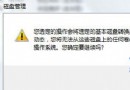
錯誤提示畫面

重命名 regedit.exe 示意圖

方法三:安全模式下修復

若上述方法無效,請進入安全模式嘗試方法一或二,或使用系統還原回復到正常時間點。

Copyright © Windows教程網 All Rights Reserved