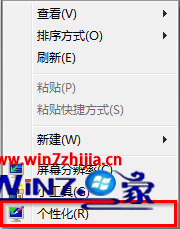
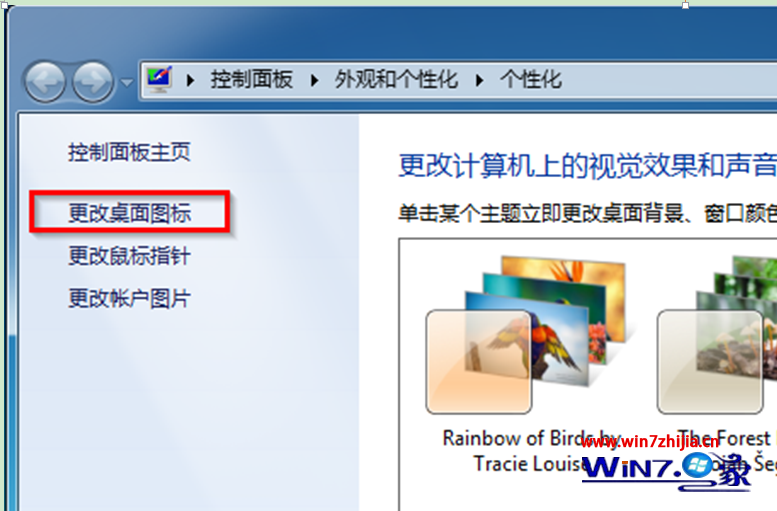
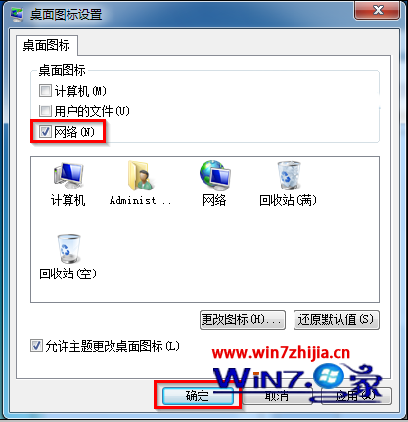
同視窗可同時勾選「電腦」、「使用者的檔案」、「控制台」、「回收站」、「網路」。取消勾選即隱藏。此設定屬使用者設定檔,不影響其他帳號。
Windows 7 死當、假死五大經典情境與解決方案
Win7 64位 雙擊捷徑變成剪貼:.lnk 檔案關聯修復註冊表方案
Win7 70 個實用技巧大全:從神祕功能到效率捷徑
Windows 7 完整移動用戶設定檔資料夾 (C:\Users) 至非系統磁碟:安裝期與安裝後兩種方案
Win7 如何進行系統更新?Windows Update 手動檢查安裝
Windows 7 遊戲無法全螢幕解決方案:驅動乾淨重裝 + 登錄 Scaling 修正
Windows 7 媒體中心看圖全攻略:圖片庫、縮略圖瀏覽、幻燈片播放、動態圖片牆
Win7 遠端桌面安全強化:網路層級驗證 + 防火牆 IPsec 加密規則