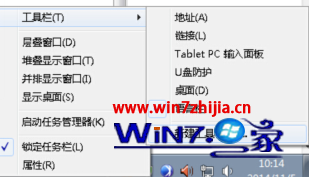
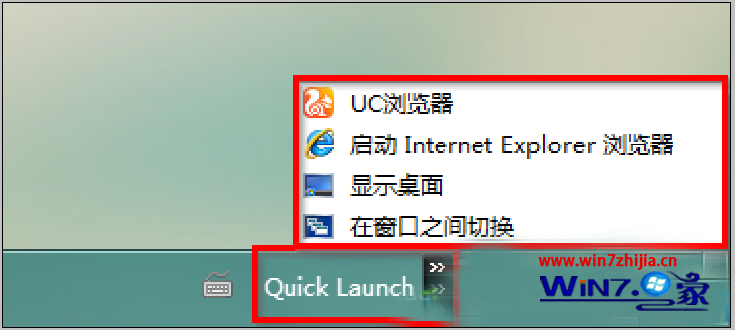
Win7 預設不顯示快速啟動列,但可透過工具列功能輕鬆喚回:
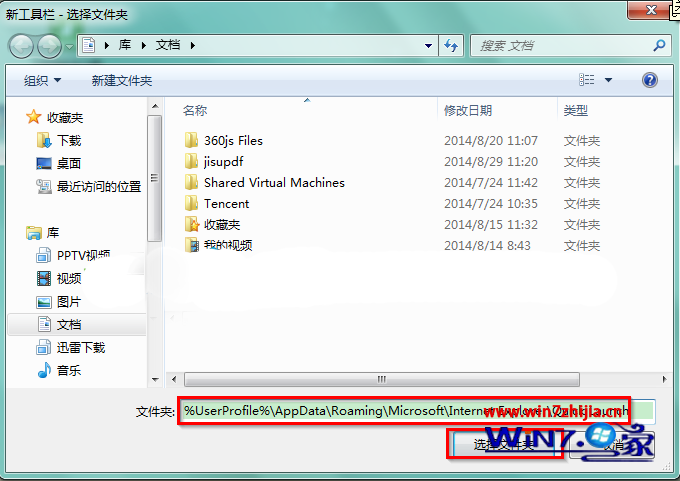
%AppData%\Microsoft\Internet Explorer\Quick Launch
若想固定在任務列左側,可右鍵任務列取消「鎖定工作列」,拖動工具列標題移動位置,再鎖定。
Win7 關閉螢幕保護程式:家庭版走控制台、旗艦版右鍵桌面個人化,版本差異圖解
Windows 7 如何格式化 C 槽並安裝系統?硬碟安裝工具或光碟安裝二選一
Win7 任務列移至右側並自動隱藏:工作列屬性 → 螢幕上的工作列位置 → 右側、勾選自動隱藏
刪除 Windows.old 資料夾釋放 C 槽空間:需以管理員身分執行 rd 指令
Win7 開機自動撥號寬帶上網 四種方法任你選:啟動資料夾、工作排程、登錄表、VBS 腳本
Win7 IE 瀏覽器修復教學:重置與還原進階設定雙重保障
Win7 小鍵盤 NumLock 失效?虛擬鍵盤一招修復
Win7 家用版升級旗艦版實測:Windows Anytime Upgrade 6 分鐘無需安裝碟完成