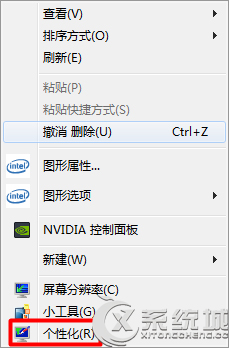
調整桌面背景圖片顯示位置為「置中」。
背景圖片即會置中顯示,不再拉伸或平鋪。
Win7 QQ/MSN 來訊息時播放器音量自動變小?關閉通訊活動偵測
Windows 7 設定多個時區時鐘教學:輕鬆掌握全球時間
Win7 旗艦版將 EXE 程式註冊為系統服務(使用 instsrv + srvany)
Win7 旗艦版無法啟動 Windows 說明與支援?匯入註冊表修復 XML 關聯
Win7 工作列完整設定指南:鎖定、自動隱藏、小圖示、位置、按鈕合併、通知區域、Aero Peek 全解析
Win7 系統保護功能救回誤刪檔案:開啟保護、建立還原點、先前版本還原實戰(內容同 ID 13552 整合版)
Win7 新增網路/舊型印表機完整圖文教學
Win7 移除捷徑小箭頭?登錄編輯器刪除 IsShortcut 值一鍵美化桌面