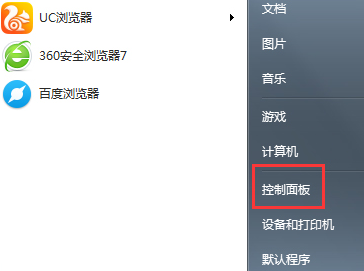
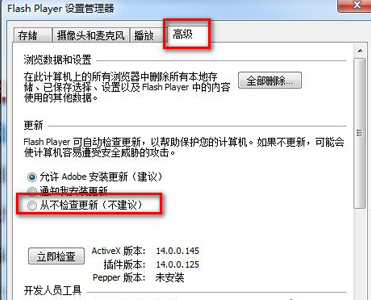
瀏覽器頻繁彈出 Flash 更新提示干擾觀看,可手動關閉自動更新,改為需時手動更新。
若未來需更新,可回此處點「立即檢查更新」手動進行。
Win7 資料夾字體變藍?取消 NTFS 壓縮屬性恢復正常顏色
Win7 快速複製檔案內容技巧:登錄新增右鍵「複製文字內容」
Windows 7必學神級快捷鍵:Win鍵組合鍵讓操作效率翻倍
解決 Windows 7 開始功能表「關機」按鈕消失的四種方法
Win7/Win8 工作列縮圖預覽改為僅顯示文字提示:修改登錄延長懸停延遲時間
Win7 開機卡在四顆光球/死機急救:BIOS 關閉 ACPI、PE/安裝盤替換 Winload.exe (Beta 7000 版相容性較佳)
Win7 資料夾「未回應」頻發?關閉 Windows Defender 即時保護可緩解
Win7 開關機卡在「正在設定 Windows Update」?教你徹底關閉自動更新