可透過登錄值 SignInOptions 控制 Office 2013 允許的登入方式(Microsoft 帳戶、組織帳戶、或全部停用)。
regedit 開啟登錄編輯器。HKEY_CURRENT_USER\Software\Microsoft\Office\15.0\Common\SignInSignInOptions。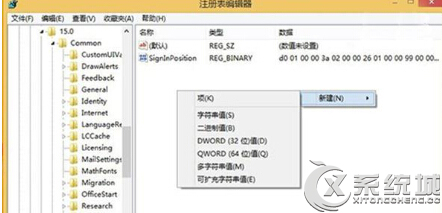
修改後重新啟動 Office 應用程式即可生效,適合企業環境統一管理登入政策。
Win7 一鍵強制關閉所有無回應程式:建立桌面捷徑 taskkill /F /FI "STATUS eq NOT RESPONDING"
Win7 進階技巧 10 選:關閉回饋、改良計算機、虛擬無線 AP 等實用功能全解析
Win7 關機時阻擋 Windows Update 強制安裝:群組原則「不要在關閉 Windows 對話方塊顯示安裝更新」
Win7 新手入門全攻略:桌面幻燈片/主題/工作列預覽/視窗切換/半邊對齊/搖晃最小化/庫/程式音量獨立控制
關閉 Win7 視窗自動最大化(Aero Snap)功能教學