防止惡意軟體竄改登錄表,群組原則封鎖登錄表編輯工具:
gpedit.msc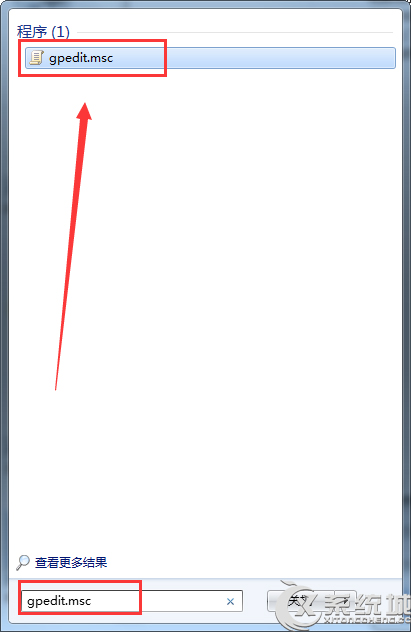
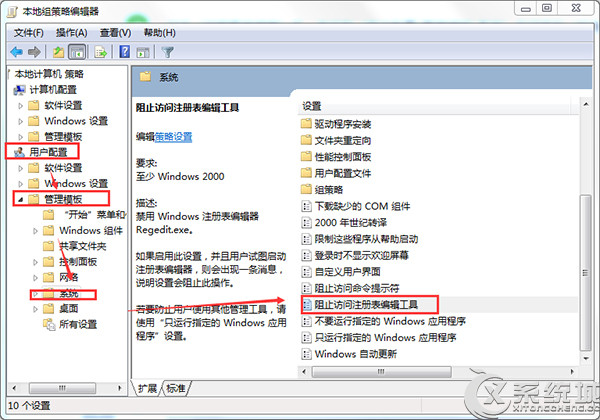
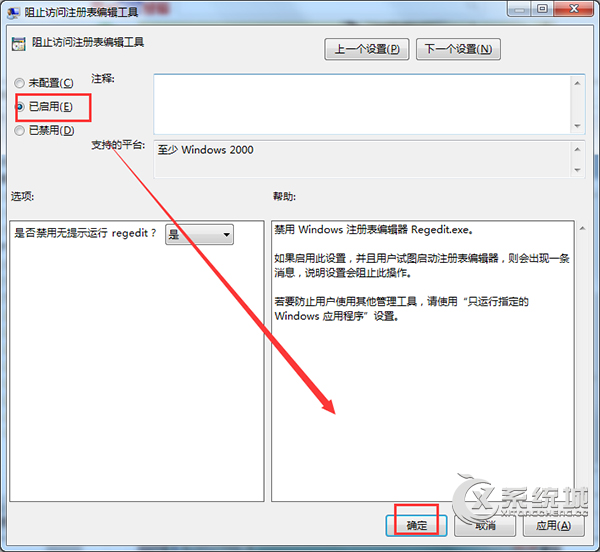
啟用後 regedit 將無法開啟,需解除原則才能使用。預防勝於治療。
Win7 套用 Win8 主題包:Windows 8 Skin Pack 1.1 體驗 Metro 風格
Win7 桌面幻燈牆紙設定:自動輪播圖片、自訂間隔、筆電省電模式暫停
Win7 硬碟安裝教學:四種情境 (Win7→Win7、Vista→Win7、XP→Win7、Vista/XP 通用) 免光碟免 USB
Windows 7 不用軟體加速開機:註冊表關閉預讀 + msconfig 設定多核心啟動
Win7 聲音獨立控制大師:通訊活動不降音、音量合成器單獨靜音 QQ/瀏覽器
Win7 修改軟體預設安裝/下載路徑:登錄修改 ProgramFilesDir 導向非系統碟