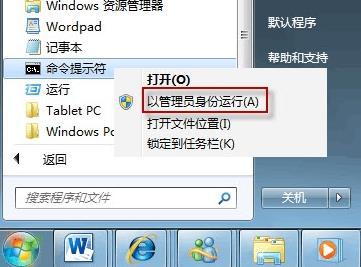
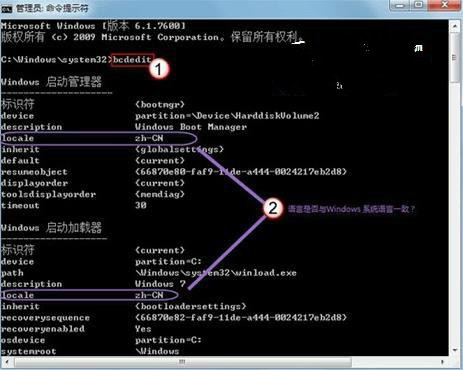
Windows 7 開機畫面顏色異常、字體錯亂,通常是開機管理器的 locale(地區設定)與系統語言不一致。透過 bcdedit 指令修正即可。
bcdedit
zh-CN
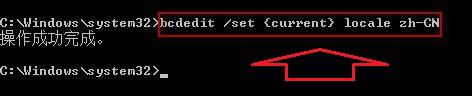
bcdedit /set {current} locale zh-CN
此問題常見於多語言系統或還原備份後,修正 locale 即可解決。
Win7 磁碟碎片整理排程:啟用、停用與自訂設定
Win7 寬帶連線錯誤 769 解決方案(網卡啟用/服務重啟)
Win7 任務管理員無法結束程序?兩招強制終止頑固進程
Windows 7 桌面「最近造訪的位置」圖示消除方法
Windows 7 常見故障排除全攻略:藍屏、死機、無法開機、列印異常等 14 大類問題解決方案
Win7 COM 元件註冊失敗怎麼辦?以管理員身分執行 regsvr32 解決
Win7 關閉/縮放/開啟放大鏡快速鍵與禁用開機自動啟動
Win 7 防止網卡被自動停用:裝置管理員電源管理取消「允許電腦關閉此裝置省電」