Windows 7 桌面所有圖示突然變成 Word 文件圖示,通常是 Normal.dotm 範本檔損毀 導致檔案關聯錯誤。刪除該檔並重啟總管即可修復。
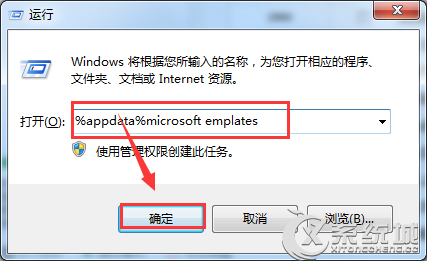
%appdata%\Microsoft\Templates
Word 會自動重建預設範本,桌面圖示即可恢復正常。
Win7 找不到攝影機捷徑?手動建立或小工具一鍵恢復 XP 風格
Win7 設定網路優先順序:有線/無線同時連線時指定優先介面
32 位元 Windows 7 升級 64 位元完整指南:必須重新安裝
筆電 Win7 無線網路「受限制存取」/「無法連線」 完整六大排查方案
微軟證實駭客已破解 Windows 7 可無限期免費使用
聯想筆記本Win7系統Fn鍵功能鍵衝突解決:BIOS設置指南
Win7 旗艦版看影片卡頓、聲音畫面不同步的原因分析與對策
Windows 7 寬帶撥號連線設定教學