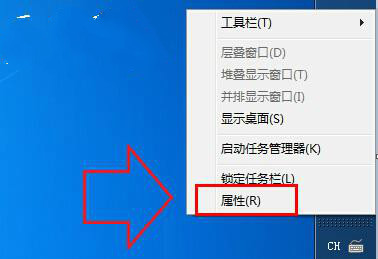
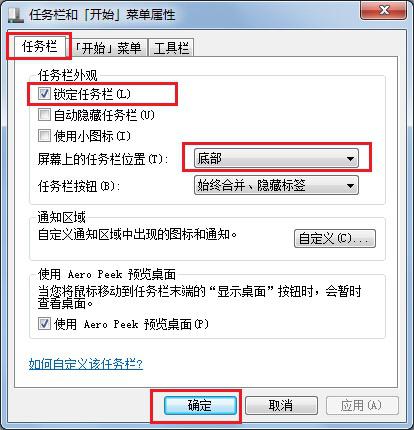
Windows 7 工作列預設位於螢幕底部,若誤拖曳至右側、左側或頂部,可透過工作列屬性快速還原。
此問題多為使用者誤操作所致,依上述步驟即可快速恢復習慣的操作介面。
Win7 更換主題不想變滑鼠指標與桌面圖示?一招鎖定設定
筆記本 Win7 旗艦版觸控螢幕雙擊無反應?同樣透過控制台啟用觸擊功能修復
Win7 錯誤報告彈窗太煩人?註冊表 DontShowUI=1 靜默上報不彈窗
Win7 搜尋檔案超慢?優化索引設定大幅提升搜尋速度
Windows Server 2008 遠端桌面效能優化 5 大關鍵技巧
Win7 工作管理員標題列消失?雙擊邊框一秒恢復
Windows 7 安裝 AutoCAD 2006 兩大法:啟用 Administrator 帳戶法 vs 相容性疑難排解法
Win7 解除安裝 IE9 瀏覽器還原舊版 IE