想讓迅雷/快車通宵下載又省電?Win7(Vista 同)可進入「睡眠狀態」(稱「離開模式」),不斷網繼續下載。方法:
regedit 進入 HKEY_LOCAL_MACHINE\SYSTEM\CurrentControlSet\Control\Session Manager\PowerAwayModeEnabled,值設 1 (16進制)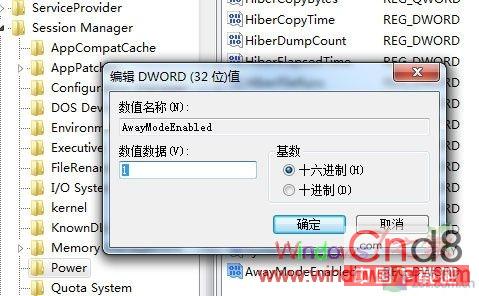
不想用時刪除該鍵值即可。OS 優劣體現在點滴細節,Win7 此功能即一例。
微軟布局雲端戰略:Windows 7/8/Phone 三螢幕雲端整合,98 元升級 Win 8 搶先體驗
Win7 禁止滑鼠喚醒電腦:清除鍵盤「允許喚醒」反而能讓滑鼠失效,怪招實測有效
Win7 64 位 PPT 簡報顯示備註?雙螢幕擴展模式 + 投影片放映設定「顯示講者檢視」
聯想筆電 Win7 連接投影機:核心顯卡/獨顯 (NVIDIA) 雙軌完整設定圖解
解決 Windows 7 機箱前置耳機孔無聲音問題(Realtek 音訊管理員設定)
Win7 3D 翻轉 (Aero Flip 3D) 快捷鍵與鎖定技巧:Win+Tab、Ctrl+Win+Tab 完全指南