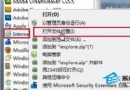
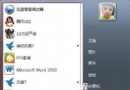
右鍵播放器 → 內容 → 相容性 → 選「Windows XP 相容模式」(下方禁止選項自行測試)。播放時系統自動關閉 Aero,馬賽克消失;程式關閉後 Aero 自動恢復。
Windows 7 主要功能改進一覽:超級任務列、程式庫、HomeGroup、觸控、UAC 滑桿、相容性保障
Windows XP 能否直接升級 Windows 7?官方說明:不可,需全新安裝或雙系統
Windows 虛擬記憶體深度解析:原理、手動設定與效能調校密技
Win7 無法檢視 GIF 動態圖片?三種解決方案
戴爾稱 Windows 7 發布拖累第三季營收,但後續拉動明顯
Windows 7 家用進階版初體驗:桌面主題、任務列預覽、正版優勢
Win7 修改 Chrome 快取目錄:mklink 符號連結導向虛擬硬碟/其他磁碟
Windows 7 SP1 安裝失敗常見三大錯誤碼與修復方案:驅動程式備份被清除是主因