OEM 激活三要素
- BIOS 含完整 SLIC 2.1 表。
- OEM 廠商憑證 (Certificate)。
- OEM-SLP 產品金鑰。
如何判斷 SLIC 版本
- 下載 RW-Everything (Read & Write Utility)。
- 執行 → 「Access」→ 「ACPI Tables」→ 「SLIC」標籤。
- 觀察關鍵位移區域(圖中紅框):
00 00 00 00 → SLIC 2.0(無法 OEM 激活 Win7)。
01 00 02 00 → SLIC 2.1(支援 OEM 激活 Win7)。
圖示對照
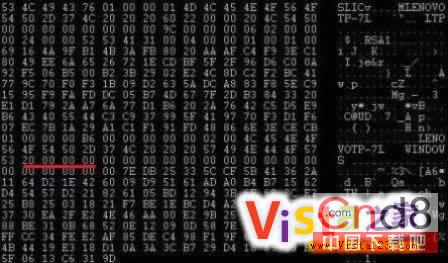
SLIC 2.0
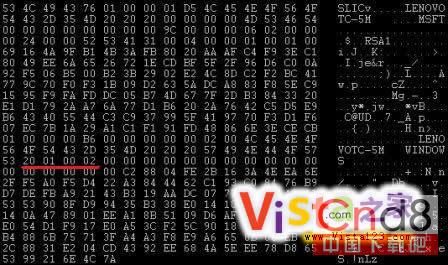
SLIC 2.1
結語
若 BIOS 為 SLIC 2.0,即便刷入 2.1 也可能因硬體限制失敗,建議確認主板廠商是否提供官方支援 Win7 的 BIOS 更新。