Windows XP Windows 7 Windows 2003 Windows Vista Windows 綜合教學 Linux 系統教學
Windows 10 Windows 8 Windows 2008 Windows NT Windows Server 電腦軟體教學

縮短程式回應等待時間,讓 Windows 7 運行更順暢

編輯:Windows 7 系統介紹

Windows 用戶對「程式未回應」提示不陌生,通常只能強制結束或繼續等待。透過登錄編輯可縮短系統回應時間,避免假死:

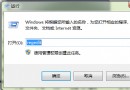
  1. 執行 regedit,展開至 HKEY_CURRENT_USER\Control Panel\Desktop。
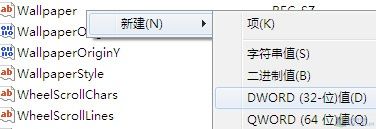
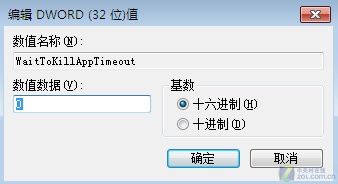
  2. 右鍵空白處新增「DWORD (32-bit) Value」,命名為 WaitToKillAppTimeout。
  3. 保持預設值(20000 毫秒)即可,儲存並重開機。

圖 1:新增 DWORD 值

圖 2:重命名為 WaitToKillAppTimeout

此值在 Vista 預設存在,Windows 7 卻移除,手動加回即可改善。微軟移除許多 Vista 功能原因不明,但對用戶有利的設定不容錯過。

Copyright © Windows教程網 All Rights Reserved