Windows XP Windows 7 Windows 2003 Windows Vista Windows 綜合教學 Linux 系統教學
Windows 10 Windows 8 Windows 2008 Windows NT Windows Server 電腦軟體教學

Win 7 桌面頑固廣告圖示無法刪除?登錄表 NameSpace 精準清除

編輯:Windows 7 系統介紹

流氓軟體在桌面建立無法右鍵刪除、Del/Shift+Del 無反應的圖示,XP 有「桌面清理精靈」Win 7 移除,需手動清登錄表:

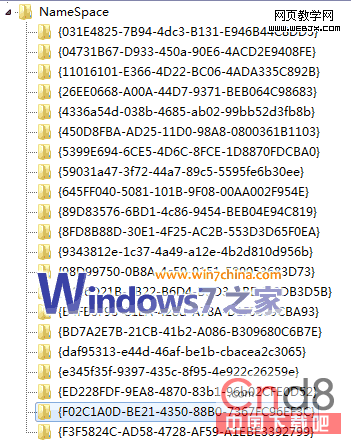
  1. Win+R → regedit → 定位 HKEY_LOCAL_MACHINE\SOFTWARE\Microsoft\Windows\CurrentVersion\Explorer\Desktop\NameSpace。
  2. 右鍵 NameSpace →「匯出」備份 .reg 檔到桌面。
  3. 逐項檢查子鍵(GUID 形式),保留系統預設(如 {450D8FBA-AD25-11D0-98A8-0800361B1103}、{645FF040-5081-101B-9F08-00AA002F954E} 等)。
  4. 刪除可疑 GUID 子鍵 → 桌面 F5 重整 → 觀察頑固圖示是否消失。
  5. 若刪錯,用記事本編輯備份 .reg,移除誤刪鍵值段落 → 雙擊匯入還原。

NameSpace 登錄結構

精準打擊流氓殘留,不傷系統正常圖示。

Copyright © Windows教程網 All Rights Reserved