Windows XP Windows 7 Windows 2003 Windows Vista Windows 綜合教學 Linux 系統教學
Windows 10 Windows 8 Windows 2008 Windows NT Windows Server 電腦軟體教學

巧設 Windows 7 進入「離開模式」睡眠下載:迅雷/快車通宵下載不耗電、不斷網

編輯:Windows 7 系統介紹

想讓迅雷、快車通宵下載又省電?Win7/Vista 可進入「離開模式」(Away Mode):系統睡眠但**維持網路連線**,下載任務持續進行。

啟用登錄檔設定

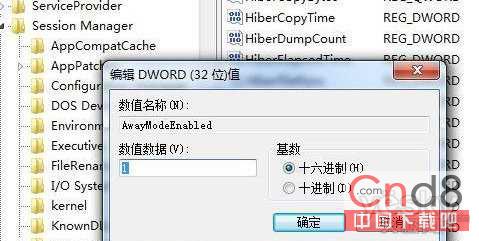
  1. regedit 定位至:HKEY_LOCAL_MACHINE\SYSTEM\CurrentControlSet\Control\Session Manager\Power
  2. 右鍵空白處 → 新增 DWORD (32位元) 值 → 命名 AwayModeEnabled。
  3. 雙擊修改數值為 1 (16 進位)。

登錄編輯器新增 AwayModeEnabled

停用方法

同路徑刪除 AwayModeEnabled 值即可恢復預設睡眠斷網行為。

此功能讓電腦在「休眠」狀態下持續下載,兼顧省電與效率,體現作業系統細節設計優劣。

Copyright © Windows教程網 All Rights Reserved