Windows XP Windows 7 Windows 2003 Windows Vista Windows 綜合教學 Linux 系統教學
Windows 10 Windows 8 Windows 2008 Windows NT Windows Server 電腦軟體教學

Win7 安裝 Office 出現 1719 錯誤:Windows Installer 服務修復指南

編輯:Windows 7 系統介紹

錯誤原因

錯誤 1719 代表 Windows Installer 服務異常或 msi.dll 註冊失敗,導致無法安裝 MSI 封裝的軟體(如 Office)。

修復步驟

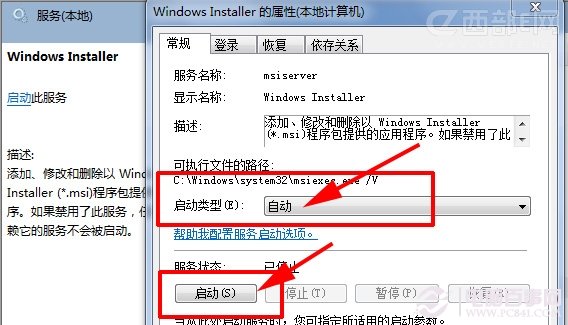
  1. 啟用 Windows Installer 服務:
    Win+R → services.msc → 找到 Windows Installer → 啟動類型設「自動」 → 點「啟動」。
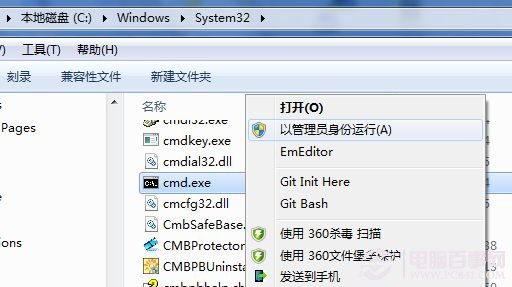
  2. 以系統管理員身分執行 CMD 註冊 msi.dll:
    Win+R → cmd → Ctrl+Shift+Enter → 輸入 regsvr32 msi.dll → 按 Enter,出現「DllRegisterServer 成功」即可。
  3. 重新安裝 Office。

Windows Installer 服務

管理員 CMD

常見失敗:錯誤碼 0x80040201

若 regsvr32 msi.dll 回報「模組已載入但呼叫 DllRegisterServer 失敗,錯誤碼 0x80040201」,通常是**未以系統管理員權限執行 CMD**。請確實用右鍵「以系統管理員身分執行」或 Ctrl+Shift+Enter 開啟。
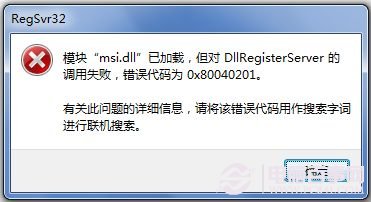
權限不足錯誤

適用範圍

同理可解決其他軟體安裝時出現的 1719 錯誤。

Copyright © Windows教程網 All Rights Reserved