Aero Shake:搖晃視窗標題列即可將其他視窗最小化。許多用戶習慣 Win+D 或 Win+M,此功能反而易誤觸發。關閉它可減少視窗管理器負擔,釋放少量系統資源。
透過群組原則關閉(專業版/企業版/旗艦版)
- Win+R 輸入
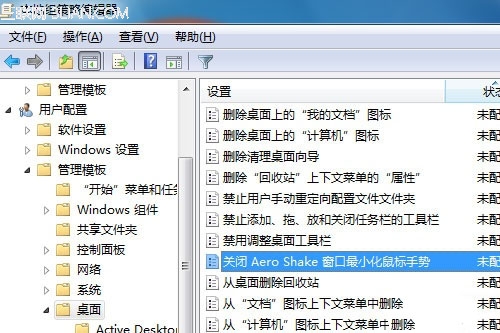
gpedit.msc 開啟「本機群組原則編輯器」。
- 依序展開:「使用者設定」→「系統管理範本」→「桌面」。
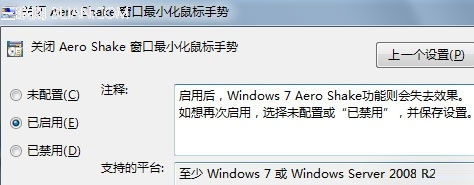
- 右側雙擊「關閉 Aero Shake 視窗最小化滑鼠手勢」。
- 選擇「已啟用」→「確定」。
登錄檔法(適用所有版本,含家庭版)
- Win+R 輸入
regedit。
- 定位:
HKEY_CURRENT_USER\Software\Policies\Microsoft\Windows\Explorer(若無鍵值請手動新增)。
- 新建 DWORD (32-bit) 值:
NoWindowMinimizingShortcuts = 1。
- 登出/重開機生效。
注意事項
- 此設定僅對 Windows 7 / Windows Server 2008 R2 有效,Vista 不支援。
- 關閉後,搖晃視窗不再觸發最小化,Win+Home(最小化非作用中視窗)仍可使用。