開機出現錯誤畫面且 F8 無法進入安全模式時,可嘗試修復開機設定資料 (BCD):
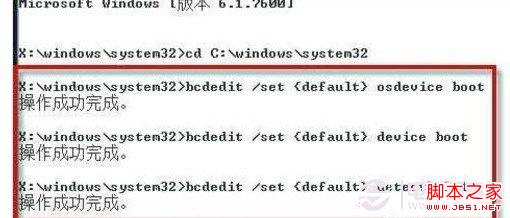
cd C:\Windows\System32
bcdedit /set {default} osdevice boot
bcdedit /set {default} device boot
bcdedit /set {default} detecthal 1
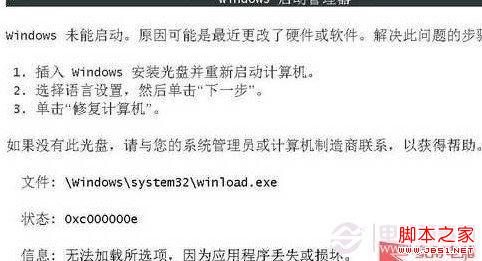
若電腦無重要資料,重灌系統仍為最快解決方案。
Win7 程式庫快速定位照片與查找文件:進階排列與搜尋技巧 (重複內容已整合)
Windows 7 自我修復示範:無光碟 5 分鐘修復無法啟動系統
Win7 DOS 環境下用 DEBUG 指令清除 CMOS 密碼:五組 I/O 埠 70H/71H 操作碼
Win7 資源管理器預覽窗格完整指南:開啟/調整/支援格式 (TXT/REG/XML/圖片/Office/影音) 一文掌握
Windows 7 TCP 半開連接數破解工具 TCP-Z 使用教學 (附 5 張截圖)
Windows 7 遠端桌面連線完整設定教學:Win7 連 Win7、防火牆、憑證、多使用者並發