Windows XP Windows 7 Windows 2003 Windows Vista Windows 綜合教學 Linux 系統教學
Windows 10 Windows 8 Windows 2008 Windows NT Windows Server 電腦軟體教學

Windows 7 編輯 Hosts 檔案綁定 IP 與域名完整教學

編輯:Windows 7 系統介紹

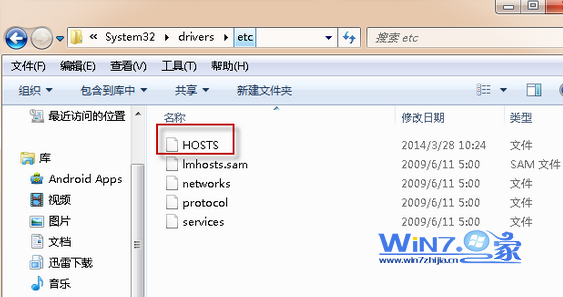
Hosts 檔案位置

C:\Windows\System32\drivers\etc\hosts(無副檔名,純文字格式)。

編輯步驟

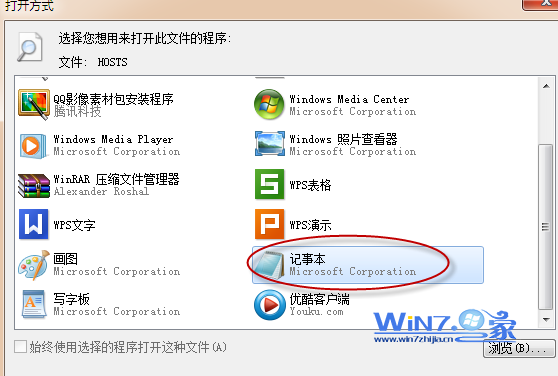
  1. 用檔案總管開啟上述路徑,雙擊 hosts → 選擇「記事本」開啟。
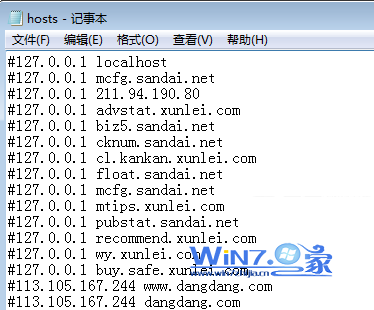
  2. 檔案預設內容包含註解說明與 localhost 解析:
# localhost name resolution is handled within DNS itself.
# 127.0.0.1 localhost
# ::1 localhost
  1. 在檔案末尾新增對應規則,格式:IP地址 域名(以空白或 Tab 分隔)。
  2. 範例:192.168.1.100 myserver.local
  3. 儲存檔案(需管理員權限,參考 Hosts 無法儲存解決方案)。

注意事項

  • 以 # 開頭的行為註解,不生效;移除 # 即啟用。
  • 惡意軟體常竄改 Hosts 導向釣魚網站,定期檢查異常條目。
  • 修改生效即時,無需重啟;若瀏覽器有 DNS 快取,可執行 ipconfig /flushdns 清除。
Hosts 檔案位置
以記事本開啟
Hosts 內容範例

Hosts 檔案是本機 DNS 解析的最高優先級,善用它可加速內部網路存取、封鎖廣告域名或進行開發測試。

Copyright © Windows教程網 All Rights Reserved