Windows XP Windows 7 Windows 2003 Windows Vista Windows 綜合教學 Linux 系統教學
Windows 10 Windows 8 Windows 2008 Windows NT Windows Server 電腦軟體教學

解決 Windows 7 任務列 Chrome 圖示顯示異常(空白/錯誤圖示)

編輯:Windows 7 系統介紹

問題現象

Chrome 圖示在任務列顯示為空白、通用圖示或錯誤圖示,重新釘選也無效。

解決方法:重建圖示快取

  1. 先關閉 Chrome,並從任務列「取消釘選」
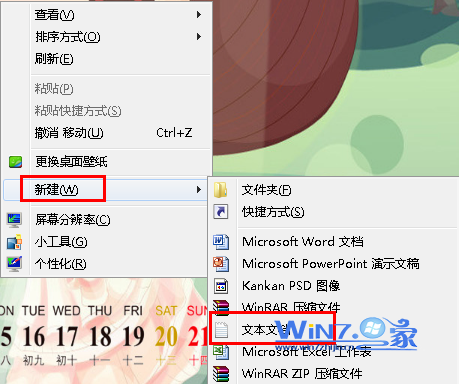
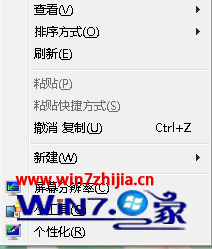
  2. 桌面右鍵 → 「新增」 → 「文字文件」
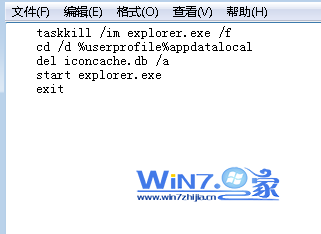
  3. 貼上以下指令並存為 fix_chrome_icon.bat:
taskkill /im explorer.exe /f
cd /d %userprofile%\appdata\local
del iconcache.db /a
start explorer.exe
exit
  1. 雙擊執行該 .bat 檔,畫面閃爍後圖示快取重建完成
  2. 重新開啟 Chrome 並釘選至任務列,圖示即恢復正常

新增文字文件

批次檔內容

原理說明

批次檔會強制重啟 explorer.exe 並刪除 iconcache.db(圖示快取資料庫),強制系統重新讀取應用程式圖示資源。

Copyright © Windows教程網 All Rights Reserved