Windows XP Windows 7 Windows 2003 Windows Vista Windows 綜合教學 Linux 系統教學
Windows 10 Windows 8 Windows 2008 Windows NT Windows Server 電腦軟體教學

Win7 修改開機動畫(開機畫面)自訂背景圖片教學

編輯:Windows 7 系統介紹

三步驟完成自訂開機背景

步驟一:修改登錄啟用 OEM 背景

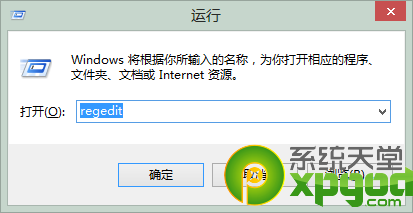
  1. Win+R 輸入 regedit
  2. 展開至 HKEY_LOCAL_MACHINE\Software\Microsoft\Windows\CurrentVersion\Authentication\LogonUI\Background
  3. 找到或新建 OEMBackground (DWORD),設值為 1

登錄編輯器路徑

步驟二:放置自訂圖片

  • 準備一張 JPG 格式 圖片,檔名固定為 backgroundDefault.jpg
  • 大小 不得超過 256 KB,否則系統會忽略而使用預設背景
  • 將圖片放入目錄:%windir%\system32\oobe\info\backgrounds\(資料夾不存在請自行建立)

步驟三:預覽效果

  • 按 Win+L 鎖定工作階段,或「開始」→「鎖定」
  • 即可看到自訂背景生效

注意事項

  1. 檔名必須為 backgroundDefault.jpg,大小寫敏感
  2. 檔案大小 ≤ 256 KB
  3. 登錄鍵值、目錄不存在時需手動建立
  4. 若要恢復預設,將 OEMBackground 設為 0 或刪除圖片檔
Copyright © Windows教程網 All Rights Reserved