Windows XP Windows 7 Windows 2003 Windows Vista Windows 綜合教學 Linux 系統教學
Windows 10 Windows 8 Windows 2008 Windows NT Windows Server 電腦軟體教學

Win7 桌面圖示全部消失?三招恢復:註冊 shell32、重建顯示桌面.scf、Win+D 替代

編輯:Windows 7 系統介紹

桌面突然空無一物 (含「電腦」、「回收桶」等系統圖示),嘗試以下方法恢復。

方法一:重新註冊 shell32.dll (最快)

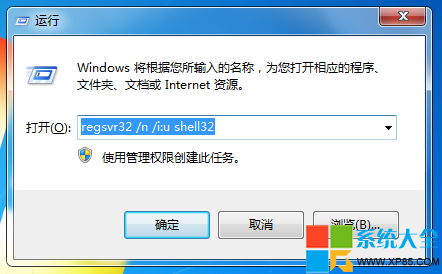
  1. Win + R → 輸入 regsvr32 /n /i:u shell32 → Enter。
  2. 彈出成功對話框 → 確定,圖示通常即刻恢復。

執行 regsvr32

成功提示

方法二:重建「顯示桌面」快捷方式 (.scf)

  1. 開啟記事本貼上:
    [Shell]
    Command=2
    IconFile=explorer.exe,3
    [Taskbar]
    Command=ToggleDesktop
  2. 另存為:顯示桌面.scf (類型選「所有檔案」)。
  3. 存放路徑:C:\Users\使用者名稱\AppData\Roaming\Microsoft\Internet Explorer\Quick Launch (Win7 路徑)。

方法三:替代快捷鍵/右鍵選單

  • Win + D:立即顯示桌面 (切換)。
  • 任務列右鍵 → 「顯示桌面」。
Copyright © Windows教程網 All Rights Reserved