Windows XP Windows 7 Windows 2003 Windows Vista Windows 綜合教學 Linux 系統教學
Windows 10 Windows 8 Windows 2008 Windows NT Windows Server 電腦軟體教學

Windows 7 移除桌面圖示底下的虛線框:關閉「圖示標籤陰影」

編輯:Windows 7 系統介紹

現象

桌面圖示文字下方出現虛線矩形框 (焦點矩形),影響美觀。

修復步驟

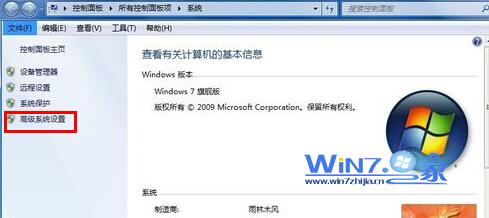
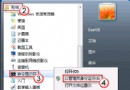
  1. 右鍵「電腦」→「內容」→ 左側 「進階系統設定」。
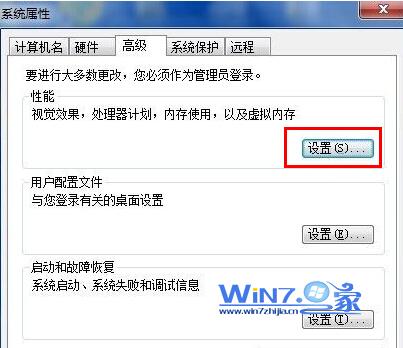
  2. 「進階」索引標籤 → 「效能」「設定」。
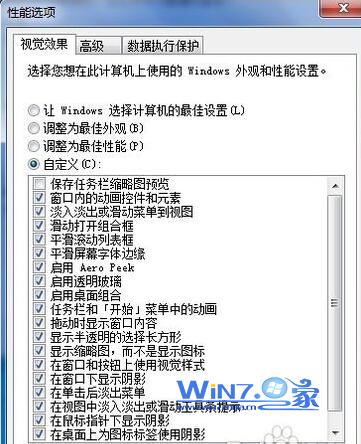
  3. 「視覺效果」→ 「自訂」 → 取消勾選 「在桌面上為圖示標籤使用陰影」 (Use drop shadows for icon labels on the desktop)。
  4. 點選「確定」套用,虛線框消失。

進階系統設定
效能設定視覺效果
取消勾選圖示標籤陰影

說明

此選項原意為增強圖示文字可讀性 (陰影效果),但在某些主題/解析度下表現為虛線焦點框。取消勾選不影響系統效能,純視覺調整。

Copyright © Windows教程網 All Rights Reserved