Windows XP Windows 7 Windows 2003 Windows Vista Windows 綜合教學 Linux 系統教學
Windows 10 Windows 8 Windows 2008 Windows NT Windows Server 電腦軟體教學

Win7 修改 IE 瀏覽器標題列文字:登錄新增 Window Title 字串值自訂簽名

編輯:Windows 7 系統介紹

想在 IE 標題列顯示個人化簽名(如「我的專屬瀏覽器」)?登錄 HKEY_CURRENT_USER\Software\Microsoft\Internet Explorer\Main 新增字串值 Window Title 並輸入想要的文字,重開 IE 即可生效。

操作步驟

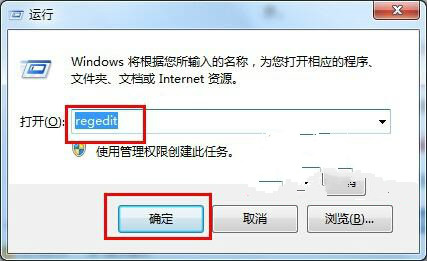
  1. Win+R → regedit。
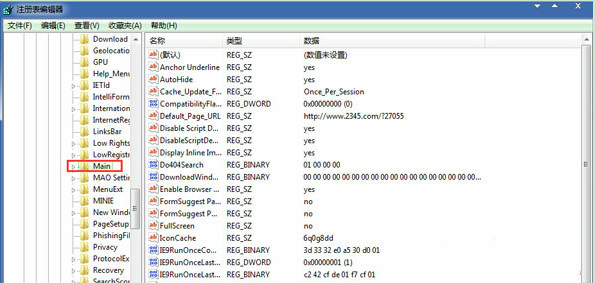
  2. 定位 HKEY_CURRENT_USER\Software\Microsoft\Internet Explorer\Main。
  3. 右鍵空白處 → 「新增」→ 「字串值」→ 命名 Window Title。
  4. 雙擊修改數值資料為想要的文字(如「歡迎使用我的 IE」)→ 確定。
  5. 重新開啟 IE 瀏覽器,標題列即顯示自訂文字。

開啟登錄編輯器

IE Main 登錄路徑新增 Window Title

注意:此設定僅影響 IE 瀏覽器,不影響 Edge/Chrome/Firefox。企業環境可透過群組原則 使用者設定→系統管理範本→Windows 元件→Internet Explorer→視窗標題 統一推送。


Copyright © Windows教程網 All Rights Reserved