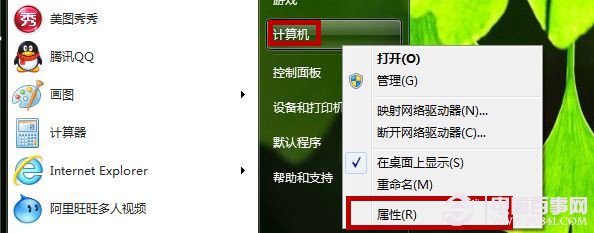
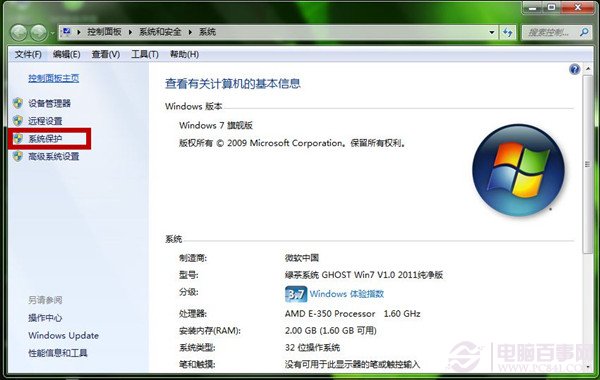
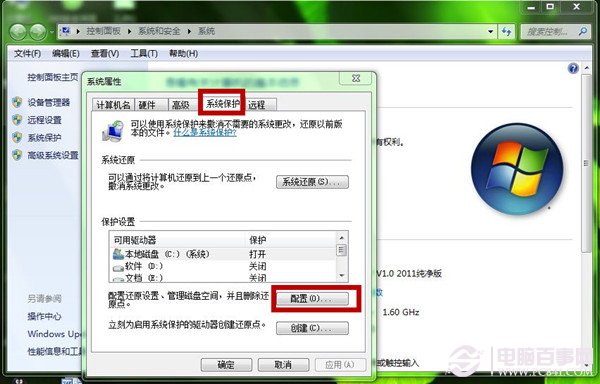
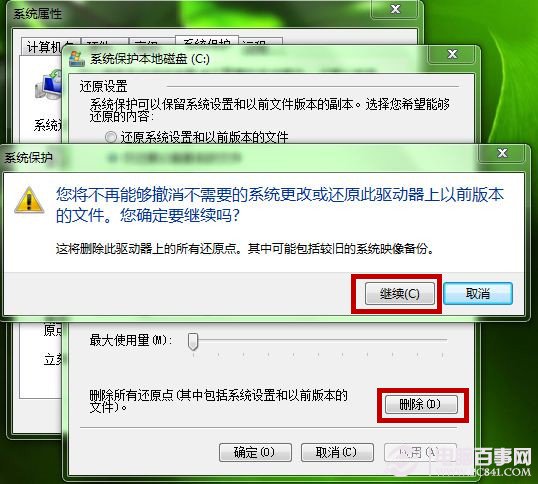
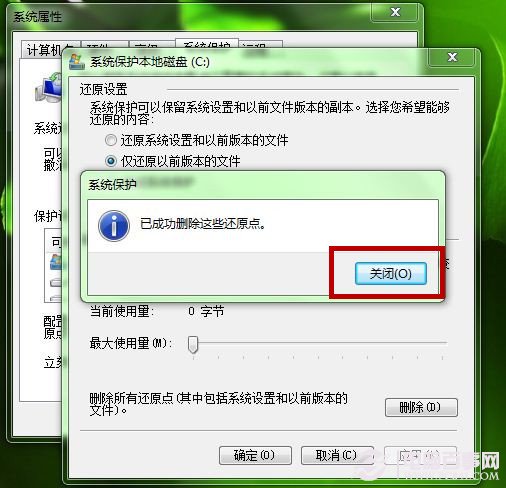
定期清理舊還原點可回收數 GB 空間,建議保留最近 1-2 個還原點以備不時之需。
瀏覽器渲染引擎大觀:Trident、Gecko 核心架構與跨平台特性解析
Windows 7 安裝 Daemon Tools 失敗?先裝 SPTD 1.60 驅動再強制執行安裝程式
微軟公關澄清:Windows 7 界面借鑒 Mac OS X 屬個人錯誤言論
Win7 將常用資料夾加入「收藏夾」快速存取教學
Win7+Win8 雙系統開機選單修復全攻略:BCDautofix、bcdedit、關閉快速啟動、修復 Metro 選單三大實戰方案
XP 升級後網速變慢?調整 QoS 預留頻寬釋放 20% 限制
Win7 音量控制圖示消失?重啟 Explorer 與 SysTray 兩步搞定
Win7恢復程序默認打開方式:INF腳本刪除用戶級文件關聯註冊表項