Windows XP Windows 7 Windows 2003 Windows Vista Windows 綜合教學 Linux 系統教學
Windows 10 Windows 8 Windows 2008 Windows NT Windows Server 電腦軟體教學

Win7 附件中找不到「錄音機」?找回 SoundRecorder.exe 完整教學

編輯:Windows 7 系統介紹

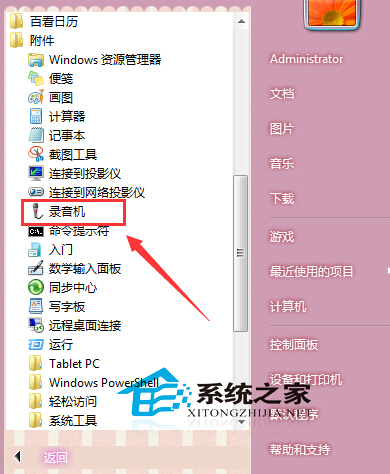
Win7 內建「錄音機」 (SoundRecorder.exe) 方便快速錄音,但有時在「開始 → 所有程式 → 附件」中消失。通常是捷徑遺失或精簡版系統未包含,以下提供兩種找回方式。

方法一:系統檔案存在,僅缺捷徑(最常見)

  1. 開啟檔案總管,前往 C:\Windows\System32。
  2. 搜尋 SoundRecorder.exe,確認檔案存在。
  3. 右鍵該檔案 → 「傳送到」 → 「桌面 (建立捷徑)」。
  4. 桌面新捷徑改名為「錄音機」。
  5. 按 Win+R → shell:Common Programs 開啟「所有使用者」開始功能表資料夾 → 進入 Accessories (附件) 資料夾 → 將桌面捷徑剪貼/複製至此。
  6. 或按 Win+R → shell:Programs 開啟「目前使用者」開始功能表 → Accessories 貼上捷徑。

方法二:系統檔案遺失(精簡版 Ghost 系統常見)

  1. 從另一台相同版本 (32/64 位元相同) 的正常 Win7 電腦,複製 C:\Windows\System32\SoundRecorder.exe 至 USB。
  2. 貼上至故障電腦 C:\Windows\System32 (需管理員權限)。
  3. 執行方法一步驟 3~5 建立捷徑至附件。

SoundRecorder.exe位置

補充:Win7 錄音機功能說明

  • 支援格式:.wma (Windows Media Audio)。
  • 無法直接存為 MP3,需轉檔軟體處理。
  • Win10/11 已改為「語音錄製器」App,支援 .m4a 格式與剪輯功能。
Copyright © Windows教程網 All Rights Reserved