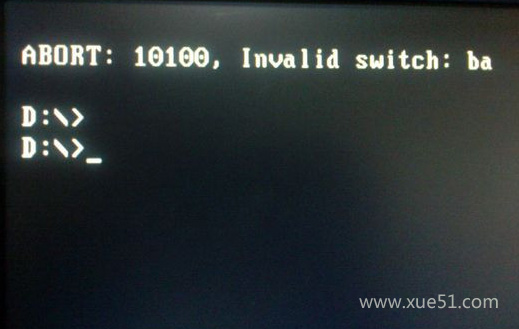
Ghost 還原 Win7 映像時出現「Error 10100, Invalid switch」,常見原因與解決方案如下:
常見原因排查
- 映像檔放在目標 C 槽:Ghost 不能將映像檔還原到存放映像檔的同一分區,請將映像檔放在其他分區或外接硬碟。
- 分區標籤/磁碟機代號含中文:改為英文字母數字。
- 使用者帳號名稱含中文:新建英文管理員帳號操作。
- 安裝路徑含中文或路徑錯誤:確認 Ghost 指令路徑正確且全英數。
- 光碟/USB 映像檔損壞:更換完好映像檔或製作新啟動媒體。
- BIOS 硬碟模式不匹配:進入 BIOS 將 SATA 模式從 AHCI/RAID 改為 IDE/Compatibility 模式(或相反),與安裝原環境一致。
建議:現代電腦建議使用 UEFI + 原生 ISO 安裝(Rufus/Ventoy 製作 USB),避免 Ghost 相容性問題。若必須用 Ghost,請確保硬碟模式、路徑、帳號全英數環境。